

Financial Services Advisor Workspace
How we would design an advisor workspace on Financial Services Cloud that brings households, holdings, consent and service requests into one view.

This is an illustrative blueprint. It is a reference architecture, not a write-up of a specific client project; outcomes depend on your data and setup.
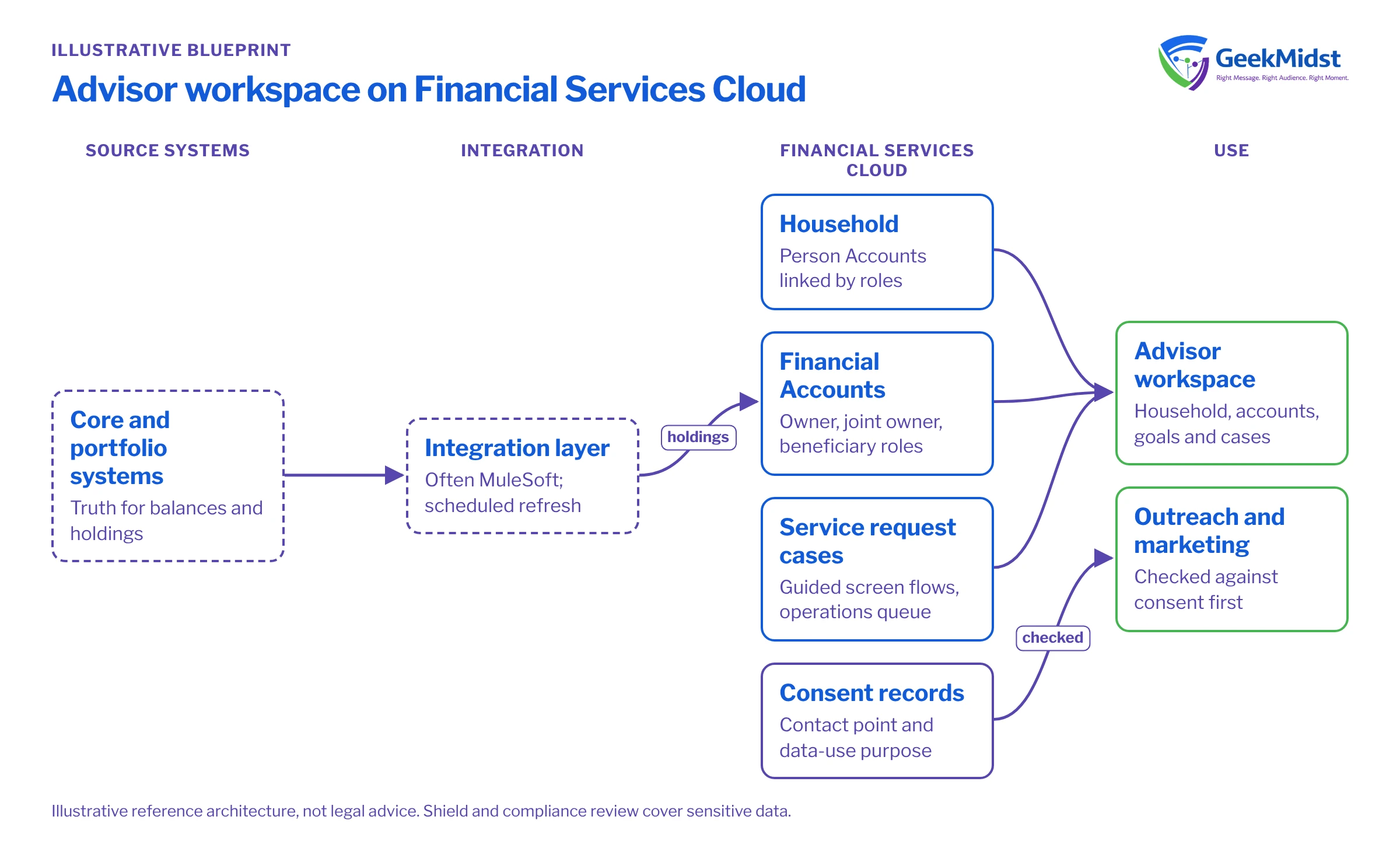
This blueprint shows how we would design an advisor workspace on Financial Services Cloud for a wealth or advisory business. Advisors and service staff work from the same household, account, consent and service records. Regulatory requirements differ by country and firm, so compliance teams must review the design; nothing here is legal advice.
Business problem
Advisors piece together a client picture from the portfolio system, a spreadsheet of household relationships, email and a separate ticketing tool for service requests. They cannot easily see which family members are linked, who holds which accounts, or whether the client has agreed to be contacted for a given purpose. Service requests are tracked inconsistently.
The goal is a single advisor workspace that shows the household, financial position, consent and service history, with the core banking or portfolio system remaining the source of truth for balances and transactions.
Architecture
Components and responsibilities
| Component | Responsibility |
|---|---|
| Financial Services Cloud | Client and household model, financial accounts, goals, onboarding and the advisor console |
| Service Cloud capabilities | Cases for service requests, queues, entitlements and knowledge for service staff |
| Privacy Center and consent objects | Recording and enforcing contact and data-use consent |
| Integration layer (often MuleSoft) | Balances, holdings and transactions from core and portfolio systems |
| Shield | Platform Encryption, Event Monitoring and Field Audit Trail for sensitive data |
| Data 360 (optional) | Unifying client data from several sources for segmentation and AI grounding |
| Agentforce (optional, later phase) | Advisor assistance such as meeting preparation, within strict guardrails |
Financial Services Cloud's documented capabilities include client onboarding, digital lending and claims. Spring '26 added Agentforce Voice for Financial Services and Flexible Hierarchies; check Salesforce Help to see whether Flexible Hierarchies suits your household and relationship structures before designing around it. For security, Shield provides encryption, monitoring and field history beyond standard retention.
Data model
Individual clients are usually Person Accounts. A Household groups related people through account-contact relationships, with roles such as primary member and dependant. Businesses and trusts are business accounts linked to the individuals who control them.
Financial Account records represent each account or policy, with Financial Account Roles showing who is owner, joint owner or beneficiary. Holdings, assets and liabilities, and Financial Goals complete the advisor's view. Balances and holdings are integrated read-mostly copies from the source systems, refreshed on a schedule, with the source and refresh time visible on the page.
Consent uses the platform's consent data model: an Individual record linked to the person, with contact point and data-use purpose consent records stating what the client has agreed to, through which channel and when. Newer orgs typically use Financial Services Cloud's standard objects, while some older orgs use managed-package objects; we confirm which before design. Our article on consent and subscription management and the consent synchronisation blueprint cover consent in more depth.
Key components
Advisor home and client view
The advisor's home page shows upcoming reviews, open requests and consent issues. The client page shows the household, accounts, goals, timeline and open cases. We keep it to what advisors use in meetings.
Service requests
Common requests are case types with guided screen flows. Back-office work routes to an operations queue, and the advisor sees status without chasing.
Consent enforcement
Consent is checked where it is used: marketing sends, advisor outreach and any sharing with partners. Winter '27 added Global Consent Manager to Privacy Center, which is worth evaluating for central consent management.
Security and access
Advisors see their own clients; teams share through role hierarchy and sharing rules. Sensitive fields are encrypted where justified, and Event Monitoring supports audit. Our security and data handling page describes how we work with client data during projects.
Testing and launch
- 01
Map relationships
Map real household and entity structures with advisors, including trusts and joint accounts.
- 02
Prove the integration
Load holdings and balances for a test book from source systems and reconcile totals with the portfolio system.
- 03
Test access rules
Sign in as advisors, assistants, branch managers and operations staff and confirm each sees only what they should.
- 04
Test consent scenarios
Withdraw and grant consent through each channel and confirm outreach, marketing and partner sharing respect it.
- 05
Pilot with one team
Launch to one advisor team and adjust layouts from feedback.
- 06
Migrate and roll out
Migrate remaining client data in waves using a tested runbook, then train each team before switching them over.
Risks and variations
- Household modelling is harder than it looks; blended families, trusts and business owners need agreed rules.
- Data freshness: advisors must know how current balances are. Show the refresh time and avoid implying real-time data you do not have.
- Over-encryption can affect search and reports; encrypt deliberately.
- Regulation: record-keeping, suitability and consent rules vary by market; involve compliance from the start.
- AI assistance should come after the data is trusted, with clear limits on what an agent may say to clients.
Our Salesforce CRM consulting, data migration services and financial services pages describe how we can help.
Sources
Designing an advisor workspace?
We can help you model households and financial accounts, plan integrations and set up consent and access rules.


