

CPQ End of Sale: Planning Your Next Step
Salesforce CPQ is end of sale, not end of life. Here is what that means, the options you have, and how to plan a move to Revenue Cloud.

Salesforce states it plainly: "Salesforce CPQ is end of sale, not end of life." The distinction matters. If you run CPQ today, nothing stops working tomorrow, and you are not on a forced timeline. You are, however, on a product that will not get new features. Its successor, Revenue Cloud Advanced, is where Salesforce is investing. This article explains what end of sale means, the options you have, and how to plan a move without rushing it.
What end of sale means
Salesforce CPQ status (per Salesforce)
| Question | Answer |
|---|---|
| Can existing customers keep using CPQ? | Yes |
| Can existing customers add users and renew? | Yes |
| Can new customers buy it? | No |
| Does it get support and critical fixes? | Yes |
| Will it get new features? | No |
| Is there an end-of-life date? | None announced |
| Is there a published end-of-sale date? | Salesforce's page does not give one |
| What is the successor? | Revenue Cloud Advanced |
| What about Salesforce Billing? | Salesforce's CPQ page does not cover its status |
If you also use Salesforce Billing, ask your account team about its status directly. We have not found a Salesforce statement on it.
What Revenue Cloud is today
Revenue Cloud is the current product name on salesforce.com. You will also see earlier names: Revenue Lifecycle Management (which Salesforce calls "an earlier product name"), Revenue Cloud Advanced (RCA), Revenue Cloud Billing, and "Agentforce Revenue Management", which still appears in Winter '27 newsroom copy. Salesforce describes these capabilities:
- A single data model for pricing, quoting, contracts and billing.
- An attribute-based product catalogue and Constraint Builder for configuration rules.
- Asset and subscription management and order orchestration.
- Tableau Next dashboards for revenue reporting.
- In Winter '27: support for up to 15,000 transaction lines per deal, agent enhancements for self-service, partner and renewal quoting, and admin setup enhancements.
Revenue Cloud has its own data model, so we recommend planning a move from CPQ as a re-implementation rather than an upgrade. Price rules, product rules, quote templates and custom code need to be redesigned, not copied.
Your options
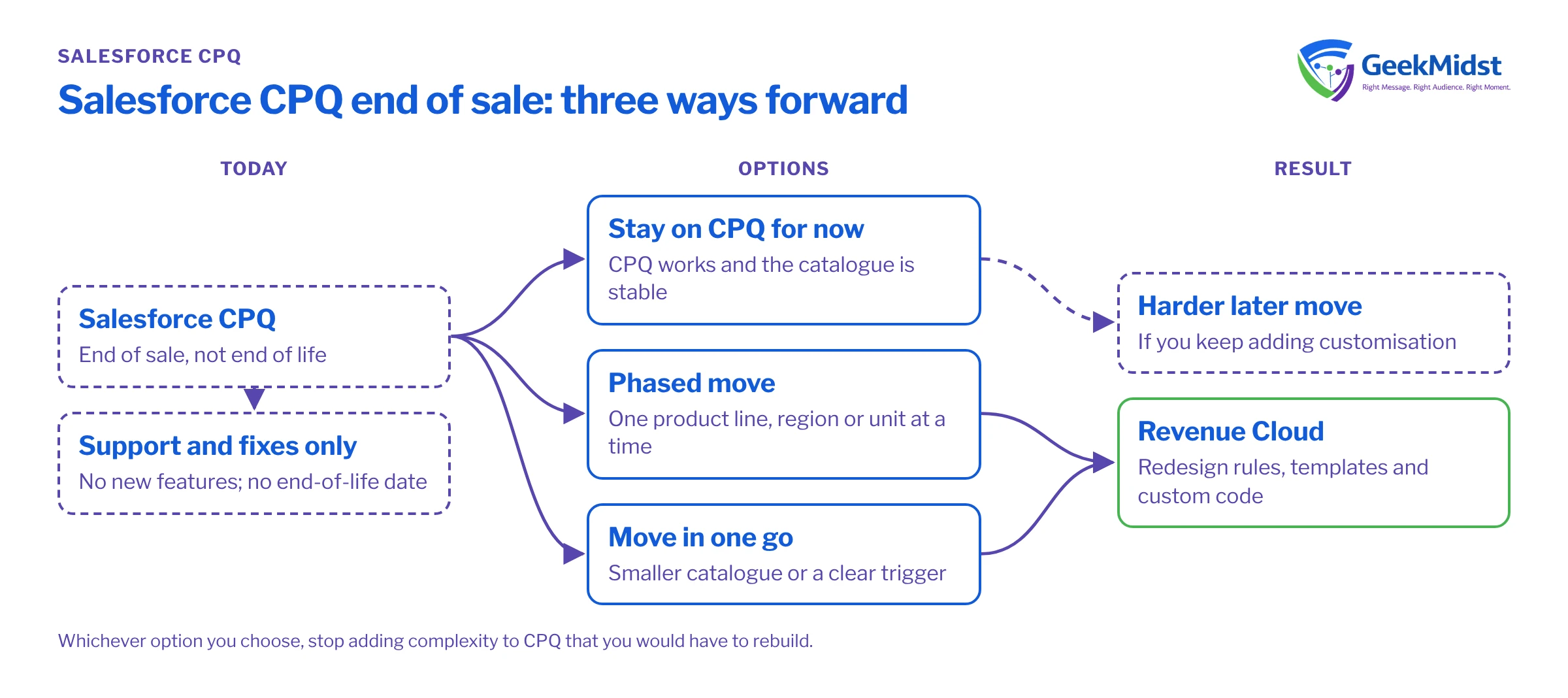
- Stay on CPQ for now. This suits you if CPQ works, your product catalogue is stable and you have no pressing need for new capability. You keep support and critical fixes. The risk is that you build more customisation on a product with no roadmap, which makes a later move harder.
- Plan a phased move to Revenue Cloud. Start with a discovery and design phase, then move one product line, region or business unit at a time. This spreads cost and risk, but means running two quoting models for a while.
- Move in one go. This suits smaller catalogues with few integrations, or organisations with a clear trigger, such as a new ERP or a pricing model change. It is faster, but needs strong testing and a firm cut-over plan.
Whichever you choose, stop adding complexity to CPQ that you would have to rebuild later.
Planning a move
Planning a CPQ to Revenue Cloud move
- 01
Document what you have
List products, bundles, price rules, product rules, discount schedules, quote templates, approvals, custom Apex and integrations to ERP and billing.
- 02
Simplify first
Retire unused products and rules. A migration is the cheapest time to remove complexity.
- 03
Map to the new model
Work out how bundles and rules translate into the attribute-based catalogue and Constraint Builder, and where processes will change.
- 04
Check licensing
Confirm with your account team what Revenue Cloud editions and add-ons you need. Don't assume entitlements carry over.
- 05
Plan data migration
Decide what moves: open quotes, active contracts, assets and subscriptions. Agree how to handle renewals mid-flight.
- 06
Prove it in a sandbox
Build a representative slice, including your most complex deal and a renewal, and test performance with realistic line counts.
- 07
Train and cut over
Train sales ops and deal desk early. Cut over at a quiet point in the quarter, with a rollback plan.
Common mistakes
- Treating it as a lift and shift. Copying CPQ logic into a new model usually copies its problems too.
- Ignoring downstream systems. Billing, ERP and revenue reporting depend on quote and order data. Include those owners from the start. Our CRM and marketing data synchronisation article covers the sync patterns involved.
- Underestimating data migration. Active subscriptions and contracts are harder to move than products. Use a migration runbook.
- Leaving renewals to the end. Renewal quoting is where errors cost the most. Test it early.
Questions we hear
Do we have to leave CPQ?
Can we still add CPQ licences?
Is Revenue Cloud Advanced the same as Revenue Cloud?
How long does a move take?
Related reading
Data migration services
Moving quotes, contracts and assets safely
→Designing a data model that scales
Principles for the new model
→Salesforce architecture consulting
Design reviews before you build
→Revenue Cloud guide
What the product covers
→Revenue Cloud sits close to Sales Cloud. Our Sales Cloud guide explains how the two connect.
Sources
Planning life after CPQ?
We can document your current CPQ setup, assess your options and scope a measured move to Revenue Cloud.


