

Winter '27 for Admins and Developers
A closer look at the Winter '27 changes admins and developers will feel day to day, with what to test and what to switch on.

Our Winter '27 highlights cover the whole release. This article looks closely at the changes admins and developers will feel in day-to-day work, and at what each one means for your build and test process. Status labels are Salesforce's own. Where a source gives no label, we say "status not stated", and you should not treat that item as GA. Winter '27 is API version 68.0.
Admin changes that need a decision
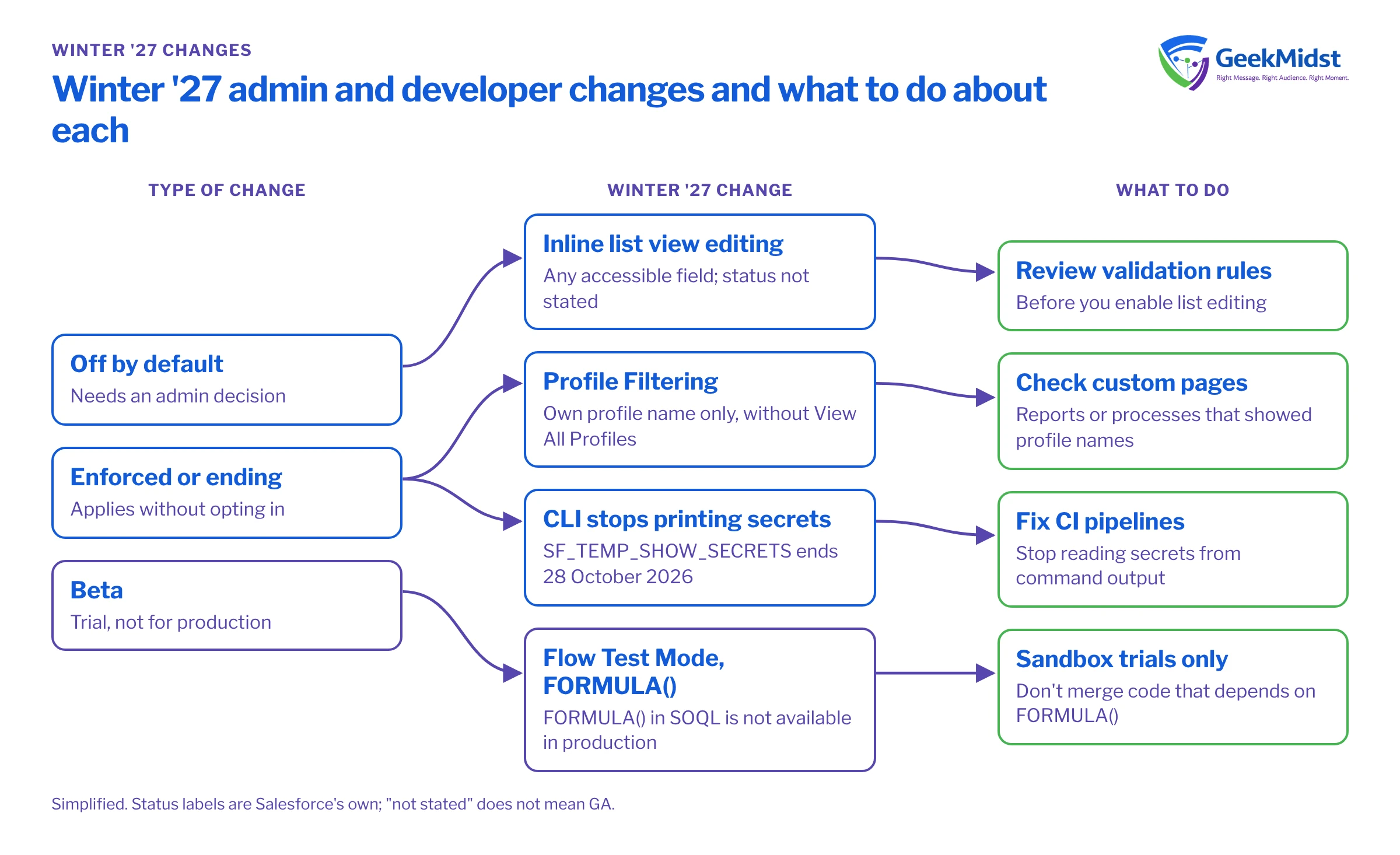
Several Winter '27 admin features are off by default. Nobody will notice them until an admin decides to turn them on.
- Flexible inline editing in list views. Users can edit any field they can access, across record types, from a list view. This saves time, but it also bypasses page layouts as a guide to what people edit. Review validation rules before you enable it. Status not stated.
- Keep manual shares on record transfer. This is a Sharing Settings option. If your teams reassign accounts often and rely on manual shares, test it with a real transfer in a sandbox. Status not stated.
- User Field History Tracking. Track up to 20 User fields, kept for 18 months. GA. This helps with audit questions such as "who changed this user's role?". Choose the fields with your security lead.
Some changes are enforced rather than optional:
- Profile Filtering is enforced in Winter '27. Users without "View All Profiles" see only their own profile name. Custom pages, reports or support processes that showed profile names to ordinary users may now look empty.
- Release updates to schedule: the View Setup Audit Trail permission is enforced in Spring '27, guest-user PII field concealment arrives in Spring '27, and Maintain Email Verification Exception is enforced on 1 December 2026.
Reporting gets record previews from Lightning reports and Common Rows Only for joined reports, which is enabled through Support. Both are Beta. Lightning dashboards in LWR Experience Cloud sites are Beta as well. Treat these as trials, not something users depend on.
Flow: better testing, clearer security
Flow had a busy release:
Winter '27 Flow changes and what to do
| Change | Status | What to do |
|---|---|---|
| Flow Test Mode with saved scenarios and assertions | Beta | Try it in sandboxes on your busiest record-triggered flows |
| Mock outputs for Action and Subflow elements | Beta | Use it to test flows that call integrations without live calls |
| User Context run mode (API 68.0+) | Not stated | Use it for flows that should respect the running user's access |
| Automatic retry on record-lock errors (after 10 s) | Not stated | Check that retried flows are safe to run twice |
| Missing-required-field and field-length warnings at save | Not stated | Fix warnings as you edit older flows |
| Mass quick action to screen flows | Not stated | Needs an ids collection variable in the flow |
| Flow Approvals: up to 10 processes per record page | Not stated | Review approval designs that worked around the old limit |
The retry on record-lock errors deserves care. A retry helps with contention, for example many child records updating one parent. But if a flow sends an email or calls an external system before the lock error, check what a second run would do. Our record-triggered flow best practices cover idempotent design.
Element grouping, the Edit History panel, version comparison, the Time component and Flow Tags (reported by Salesforce Ben from the release notes) make large flows easier to maintain. Element grouping has "rolling availability", so not every org will see it at once.
Developer changes
Apex. Heap limits rise from 6 MB to 10 MB synchronous and from 12 MB to 25 MB asynchronous (status not stated). This removes some pressure on code that builds large payloads. It does not replace good design: still query selectively and process in chunks. Elastic limits for Batch Apex, the Apex Symbol API in the Tooling API, and Apex cursors for Data 360 DMOs are all Beta. Apex integration tests using @IntegrationTest, which call real services from scratch orgs, are a Developer Preview. Keep your existing mocks and reliable unit tests.
SOQL. FORMULA() in WHERE clauses is Beta and not available in production. Don't merge code that depends on it.
LWC. Complex template expressions (API 66.0+) are GA, and lwc:external for third-party web components is GA but requires Lightning Web Security. Microfrontend embedding with lightning-ui-embedding is Beta. Salesforce Multi-Framework adds Angular support and 2GP packaging (status not stated).
Tools. Web Console, a browser IDE on VS Code for the Web, is GA. In Salesforce CLI, the api request rest and api request graphql commands now need Node.js 22+. The CLI no longer prints secrets, and the SF_TEMP_SHOW_SECRETS workaround ends on 28 October 2026. Check CI pipelines that read secrets from command output. Salesforce also lists a Salesforce Development plug-in for Claude Code in the Claude Code marketplace. The admin blog and the newsroom count its skills differently, so check the listing itself.
DevOps naming. The Winter '27 platform blog calls DevOps Center "Lifecycle Center (formerly DevOps Center)", while the Platform page still says "Agentforce DevOps Center". Expect both names in documentation for a while. Our deployment strategies guide still applies.
A two-week Winter '27 test plan
- 01
Day 1–2: inventory
List flows, Apex jobs, LWCs and integrations touched by the changes above.
- 02
Day 3–5: regression
Run your UAT scripts in a sandbox, focusing on sharing, profiles and record-triggered flows.
- 03
Day 6–7: tooling
Upgrade CI to Node.js 22+ and remove any reliance on printed CLI secrets.
- 04
Day 8–10: opt-in features
Agree which off-by-default features to enable, and write short user notes.
- 05
Day 11–14: beta trials
Try Flow Test Mode and other betas in a sandbox only, and record findings.
Questions we hear
Do I have to change my flows to API 68.0?
Can we use FORMULA() in SOQL now?
Will the higher heap limits fix our heap errors?
Is Lifecycle Center a new product?
Related reading
Winter '27 release highlights
The whole release, grouped by area
→When to use Apex instead of Flow
Choosing the right tool
→UAT test plan template
Structure your regression runs
→Salesforce Platform guide
Building blocks of the platform
→Our Flow automation services and Salesforce development services can help you adopt these changes safely.
Sources
Need a Winter '27 regression plan?
We can review your flows, Apex and integrations against the Winter '27 changes and help you test them in a sandbox.


