

Field Service Scheduling and Mobile Workforce
How we would structure work orders, scheduling, mobile technicians and van stock on Salesforce Field Service and Operations.

This is an illustrative blueprint. It is a reference architecture, not a write-up of a specific client project; outcomes depend on your data and setup.
This blueprint shows how we would set up Field Service and Operations for an organisation that installs, maintains and repairs equipment at customer sites. It covers the path from a service request to a completed visit: work orders, scheduling, mobile technicians and the parts they carry. Formerly Field Service Lightning, it is now called Field Service and Operations on Salesforce's product page.
Business problem
Dispatchers plan the day in spreadsheets and phone calls. Technicians arrive without the right parts or the asset's history, so visits end in a second trip. Parts used on site are recorded late, so van stock and billing drift apart, and managers have no single view of open or overdue work.
The aim is one connected process: requests become work orders and scheduled appointments, technicians complete them on an offline-capable mobile app, and parts consumption updates inventory.
Architecture
Components and responsibilities
| Component | Responsibility |
|---|---|
| Service Cloud | Cases and entitlements that start most field work |
| Field Service and Operations | Work orders, service appointments, resources, territories and inventory |
| Scheduling and optimisation, Scheduling Console | Assigning appointments by skill, territory, availability and travel |
| Field Service mobile app | Offline-first technician app with maps and Voice to Form |
| Asset Service Management | Asset records, service history and maintenance planning |
| Visual Remote Assistant | Remote video support for technicians or customers |
| Integration layer (often MuleSoft) | ERP for parts, costs and invoicing; HR or payroll for resources |
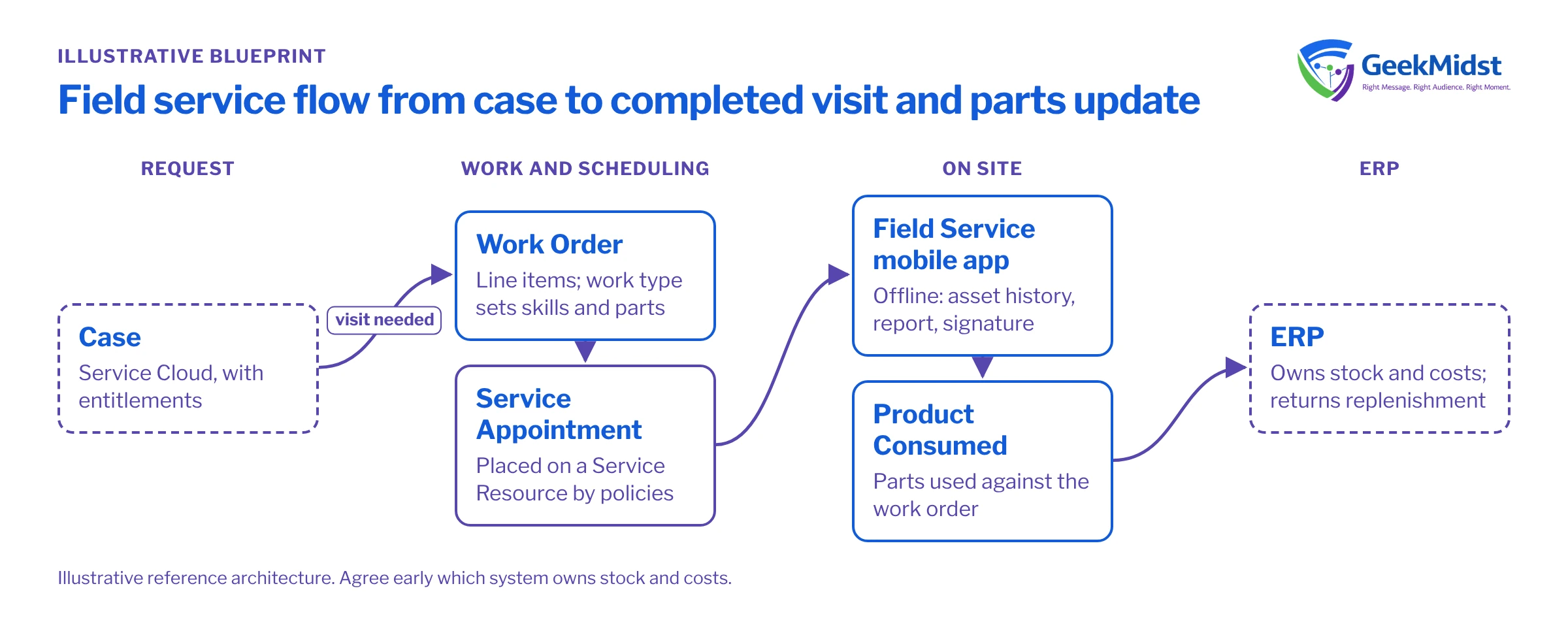
Work usually starts in Service Cloud, where a case becomes a work order when a visit is needed. The Scheduling Console arrived in Summer '26 and was enhanced in Winter '27, Native GIS maps came to the mobile app in Spring '26, and Voice to Form is multilingual from Winter '27. Autonomous Scheduling with Agentforce Voice appears in Winter '27 materials without a stated status, so we treat it as something to evaluate, not a dependency.
Data model
The core chain is Case → Work Order → Work Order Line Item → Service Appointment. The service appointment is the scheduled visit the optimiser places on a technician's calendar.
People and places use Service Resource (the technician), Service Territory, Operating Hours and Skills. Equipment on site is an Asset, so every work order carries its history.
Parts use Location (warehouse or van), Product Item (stock of a product at a location), Product Required (what a job needs) and Product Consumed (what was used). We agree early which system owns stock and costs; usually the ERP, with Salesforce holding an operational copy. Our article on designing a data model that scales covers the wider principles.
Key components
Work types and templates
Work types define duration, skills and parts for common jobs, so work orders are complete without manual entry. Most scheduling quality comes from here.
Scheduling policies
Policies combine rules (skills, territory, hours) with objectives (travel, priority). We start small, test against historic demand and give emergency work its own policy.
Mobile experience
We design around what a technician needs offline: the appointment, asset history, a short service report, parts and a signature. Offline behaviour must be tested in the field, not a browser.
Parts and van stock
Parts consumed are recorded against the work order and sent to the ERP, which returns replenishment. See our integration error-handling guide for the retry and alerting patterns we use.
Testing and launch
- 01
Model one region first
Load territories, resources, skills and operating hours for a single region and check them with the people who dispatch there today.
- 02
Replay historic demand
Schedule a past week of real jobs in a sandbox and compare the result with what dispatchers actually did. Adjust work types and policies before anyone in the field sees it.
- 03
Field-test the mobile app
Give the app to a few technicians on real jobs, including poor-coverage sites, and check sync and parts entry.
- 04
Test integrations with failure cases
Send bad part codes and simulate ERP downtime; confirm errors are visible and recoverable.
- 05
Run parallel for a short period
Let dispatchers schedule in Salesforce while keeping the old process as a fallback until they trust it.
- 06
Roll out by region
Expand territory by territory, reviewing schedule quality with dispatchers after each wave.
Risks and variations
- Poor master data (skills, durations, addresses) undermines optimisation. Budget time to clean it.
- Over-customising the mobile app makes upgrades harder and slows technicians down.
- Inventory ownership must be settled before build; two systems both "owning" stock is a common failure.
- Contractors and subcontractors may need an Experience Cloud portal rather than full licences.
- Industry variants: utilities, manufacturing and telecoms all use the same core model; see our manufacturing page.
Our Salesforce implementation services and integration services cover both the Field Service build and the ERP connection.
Sources
Scoping a field service rollout?
We can help you model territories, work types and parts, and plan a region-by-region launch.


