

B2B Lead Nurturing with Account Engagement
A reference design for B2B nurture programmes in Account Engagement (formerly Pardot), from track design and scoring to a clean, measurable hand-off to sales.

This is an illustrative blueprint. It is a reference architecture, not a write-up of a specific client project; outcomes depend on your data and setup.
Most B2B buyers are not ready to talk to sales when they first download a guide or register for a webinar. Without nurturing, those leads either go cold in the database or get passed to sales too early and ignored. This blueprint describes a lead nurturing design in Account Engagement (formerly Pardot) that moves prospects forward and hands them to sales at an agreed point.
This is a reference blueprint, not a write-up of a specific client project. Thresholds, timings and content themes are examples for you to calibrate.
The business problem
- Every new prospect receives the same newsletter, whatever their role or interest.
- Sales and marketing disagree on what a qualified lead is, so hand-offs are argued about rather than acted on.
- Scores only ever go up, so a prospect who was active two years ago still looks hot.
- Nobody knows which nurture content contributes to pipeline.
Nurture tracks
| Track | Who enters | Content focus | Exit |
|---|---|---|---|
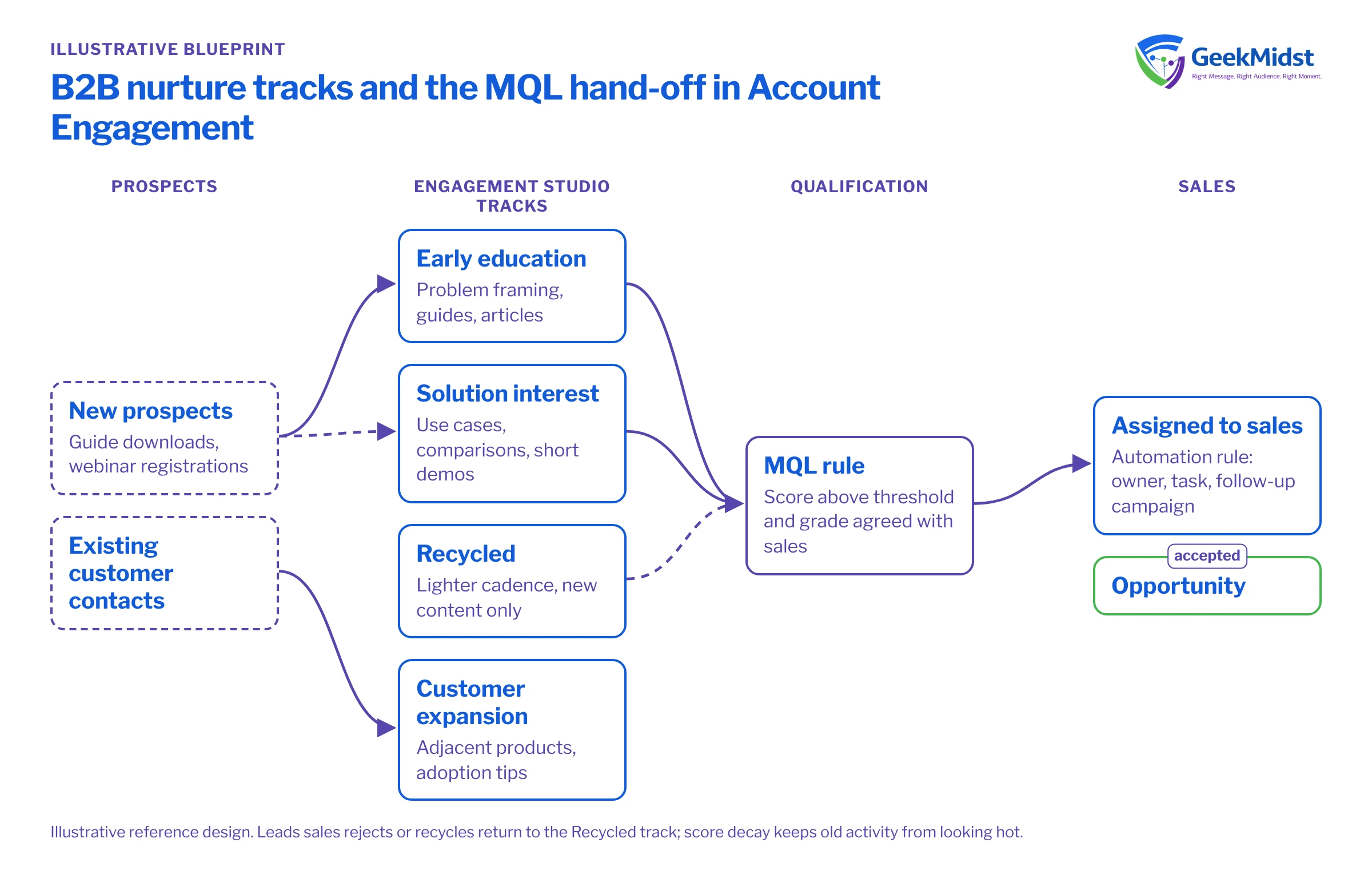
| Early education | New prospects with no product-specific activity | Problem framing, guides, practical articles | Shows product interest or reaches MQL |
| Solution interest | Prospects who viewed product or pricing pages | Use cases, comparisons, short demos | Reaches MQL or is assigned to sales |
| Recycled | Leads sales returned as not ready | Lighter cadence, new content only | Re-qualifies or goes quiet |
| Customer expansion | Contacts at existing customer accounts | Adjacent products, adoption tips | Opportunity created or opt-out |
Programme design in Engagement Studio
Each track is an Engagement Studio program built from actions, triggers and rules. A typical step looks like: send an email, wait for a link click for up to five days, then branch. Prospects who click get the next deeper piece; those who do not get a different angle on the same theme. Rules check score, grade or a field such as industry before each send, so the content matches who the prospect is.
Keep programs readable. Long single programs with dozens of branches are hard to test and nearly impossible to hand over. Several short programs, with prospects moved between lists by automation rules, are easier to maintain. Our article on Engagement Studio program design patterns covers this in more detail.
Scoring, grading and the hand-off
Score measures interest; grade measures fit. Use both.
- Scoring. Weight high-intent activity (pricing page visits, demo requests, webinar attendance) above low-intent activity (generic email opens). Use scoring categories if you sell distinct product lines.
- Score decay. Plan how scores fall after a period of inactivity, for example with automation rules that reduce score or flag stale prospects.
- Grading. Build a profile per ideal customer type with criteria such as job level, industry and company size, so grades A to F mean something.
- MQL rule. Agree a combination such as "score above the threshold and grade B or better" with sales, and write it down.
When a prospect meets the MQL rule, an automation rule assigns them, either to a user, a queue or via the active Salesforce assignment rule, adds them to a sales follow-up campaign, creates a task and removes them from the education track. Sales then records an outcome, such as accepted, rejected with a reason, or recycled. Rejected and recycled leads return to the recycled track, not the start. For routing detail, see our lead routing and assignment blueprint.
Data model and consent
- Map the prospect fields nurture depends on (industry, job level, product interest, lifecycle stage) and confirm how each syncs with Salesforce Lead and Contact fields, including which system wins.
- Use connected campaigns so Account Engagement assets roll up to Salesforce campaigns. This is the basis for any later influence reporting.
- Capture consent and its source on every form. Respect Opted Out and Do Not Email, and confirm in your connector settings how Opted Out syncs with Email Opt Out in Salesforce.
- Avoid storing one-off campaign data in custom prospect fields; use lists, tags or campaign membership instead.
Testing and launch
- Create test prospects that match each track's entry criteria, including edge cases such as missing industry.
- Use the Engagement Studio test feature to walk each path and check that rules evaluate as expected.
- Send every email to internal seeds and check variable tags and fallbacks.
- Trigger the MQL rule with a test prospect and confirm assignment, task, campaign membership and Salesforce sync.
- Start programs with a small list, check reports after the first week, then add the full audience.
How to measure it
- Conversion between stages, from new prospect to MQL, MQL to sales accepted and accepted to opportunity, compared over time.
- Time in stage, which shows whether nurturing speeds movement.
- A comparison group. In B2B, a strict holdout is often impractical, but you can hold back one segment or region from a new track for a period and compare stage conversion.
- Campaign influence on opportunities through connected campaigns, read as an indicator rather than proof of cause.
Risks and variations
- Sync errors between Account Engagement and Salesforce silently stop hand-offs. Monitor the sync error queue; see prospect sync errors.
- Over-emailing when one prospect sits in several programs. Use suppression lists and a cadence rule.
- Business units. Organisations with separate brands may run separate tracks per business unit.
Our Account Engagement consulting service covers design and build of programs like these.
Questions we hear
How many emails should a nurture track have?
Should opens count towards the score?
Can we nurture contacts who are already in an open opportunity?
Rethinking your nurture programme?
We can review your current Account Engagement setup, scoring model and hand-off, then propose tracks and rules both sales and marketing can agree on.


