

Sales ROI Calculator
Estimate the return on a sales investment from your own numbers, across conservative, expected and optimistic scenarios. Everything runs in your browser.

This sales ROI calculator estimates the return on a sales technology investment from your own numbers. It models two benefits: time your reps save preparing business cases and proposals, and profit from extra deals won. It sets those against one-off and running costs over the period you choose, in three scenarios. The example values are placeholders, not benchmarks, so replace them before you use the result. Everything is calculated in your browser.
Sales ROI calculator
The numbers below are example values, not benchmarks. Replace them with your own. Everything is calculated in your browser; nothing is stored or sent unless you choose to share the result.
How the numbers are calculated
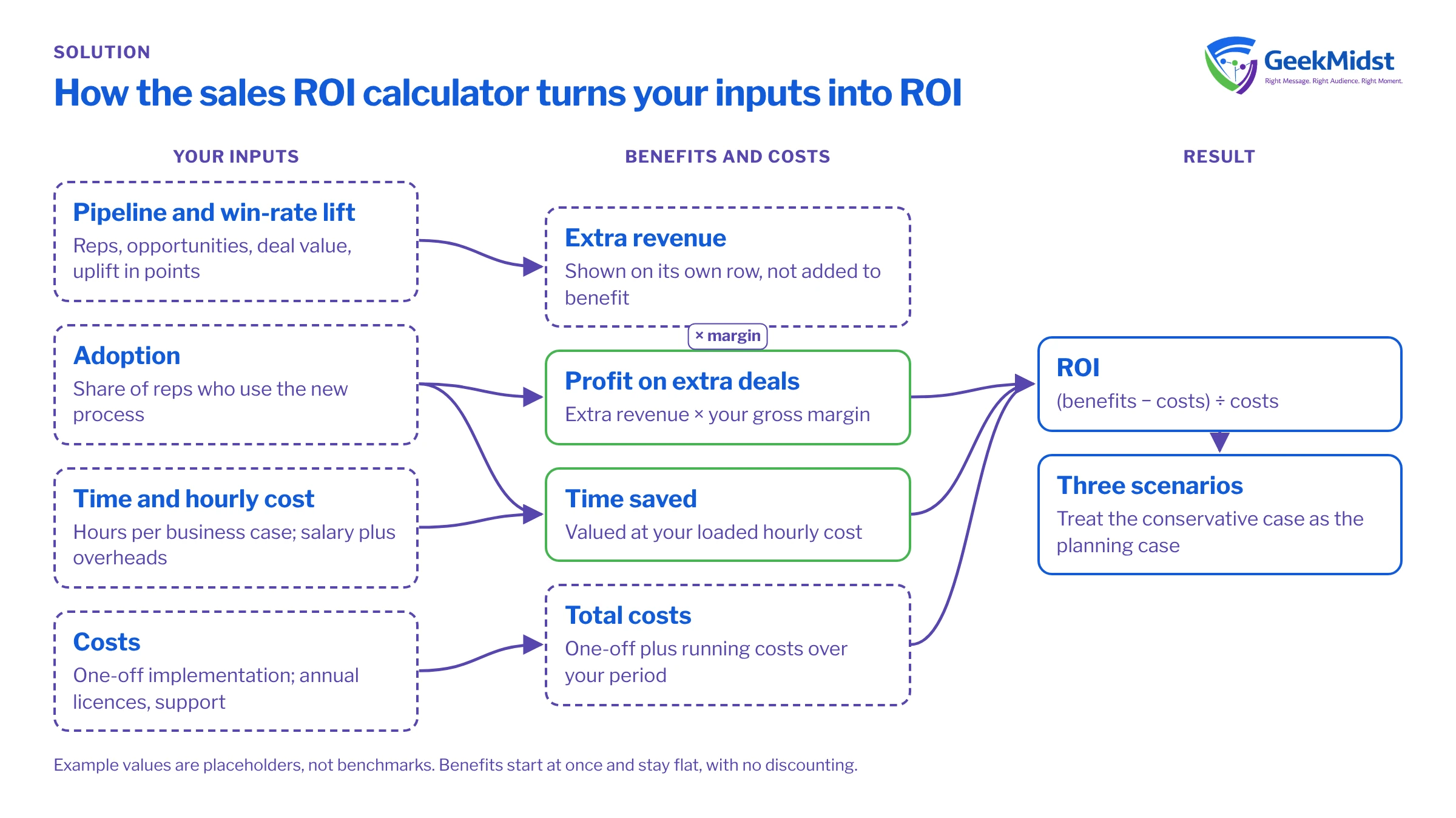
- Time benefit = reps × business cases per rep × hours per case × time saved % × adoption % × hourly cost, per year.
- Profit benefit = reps × opportunities per rep × deal value × win-rate increase (points) × gross margin % × adoption %, per year. Revenue is shown separately and is not added to the benefit, to avoid counting it twice.
- Total cost = one-off cost + (annual software + annual support) × years.
- ROI (%) = (total benefit − total cost) ÷ total cost × 100, over the analysis period.
- Payback = one-off cost ÷ monthly net benefit (annual benefit − annual running costs, divided by 12). If the monthly net benefit is zero or negative, payback is not reached.
- Benefits are assumed to start immediately and stay flat; no discounting is applied. Real projects ramp up, so treat the conservative column as the planning case.
How to choose your assumptions
Start with figures you can defend in a finance review.
- Team and pipeline: take rep counts, opportunities per rep, average deal value and current win rate from your CRM reports for the last full year, not from a target.
- Time per business case: ask a few reps to time their next proposals, or use a short survey. Estimates from managers tend to be optimistic.
- Loaded hourly cost: use salary plus overheads, agreed with finance.
- Costs: include the one-off implementation, annual software and licence costs, and annual support and administration. If you are not sure what the licences cost, ask your Salesforce account team rather than guessing.
- Win-rate increase: this is the assumption that moves the result most. Enter it in percentage points, so 1 means a 20% win rate becomes 21%. Keep the conservative figure small.
- Adoption: the share of reps who will actually use the new process. Tools that nobody opens produce no benefit, so do not assume full adoption.
Write down where each figure came from. The business case generator has a field for sources and assumptions, and reviewers will ask.
Avoiding double counting: revenue vs margin
A common mistake is to add extra revenue to the benefit line. Revenue is not return: delivering it costs money. The calculator therefore multiplies extra revenue by your gross margin and counts only the profit as a benefit. Extra revenue is still shown, on a separate row marked "not added to benefit", so you can quote it without inflating the ROI.
Two other kinds of double counting are worth checking. First, do not count the same saved hour twice, for example as both "time saved" and "more selling time that wins more deals". Pick one route for each benefit. Second, if another project already claims a win-rate improvement, such as new pricing or a sales methodology, agree how the gain is split before both business cases count it.
Why three scenarios
A single figure invites a single question: "Is that number right?" It never is exactly. Three scenarios show how sensitive the result is to the assumptions you are least sure of: win-rate increase, time saved and adoption. If the conservative case still pays back, the decision is easier. If only the optimistic case works, you have learned something important before spending money. We suggest treating the conservative column as the planning case, because real projects take time to ramp up.
What the calculator does not do
- It does not forecast. The results follow from your inputs and nothing else.
- It assumes benefits start at once and stay flat, and it applies no discounting. Finance teams may want a net present value, which you can work out separately.
- It does not include costs you leave out, such as internal project time, data clean-up, training or change management. Add them to the one-off or annual cost fields.
- It does not store or send your inputs. You can copy the results to share them.
- It covers sales productivity and win rate only. Service, marketing and agent use cases need their own models.
For a fuller method, read how to build a sales ROI model. To measure ROI on Sales Cloud or Revenue Cloud after go-live, see Salesforce ROI analysis.
Salesforce's own ROI calculators
Salesforce publishes its own calculators. There is an Agentforce ROI Calculator, which models agent use cases and produces a downloadable report, and a form-based Sales ROI Calculator that estimates revenue growth and seller productivity. Salesforce says the Agentforce calculator's results are "provided for illustrative purposes only", and that it excludes implementation, licence and Data 360 credit costs. If you use it, add those costs back before comparing it with this model. We do not quote Salesforce's figures here, because they depend on Salesforce's own assumptions.
From numbers to a business case
When the numbers look reasonable, open the business case generator on the same device in the same visit. It picks up your three scenarios and lays them out with your challenges, objectives, risks and success measures. You can also start from the sales business case template.
Questions we hear
Is my data sent anywhere?
Why is extra revenue not part of the benefit?
What win-rate increase should we use?
Can we use this for Agentforce or service use cases?
Sources
Want a second pair of eyes on your model?
Share your assumptions and we can review them with you, and help scope the Salesforce work behind them.


