

How to Measure Salesforce ROI
A method for measuring Salesforce ROI on Sales Cloud and Revenue Cloud, from baselines and benefit categories to full costs and post-launch tracking.

People searching for a Salesforce ROI calculator usually want one number. A credible number needs three things first: a baseline taken before go-live, benefit categories that do not overlap, and a full view of cost, including the parts that never appear on a licence invoice. This page sets out a method for Sales Cloud and Revenue Cloud. You can model the sales side straight away in our sales ROI calculator, then use this page to make the numbers stand up.
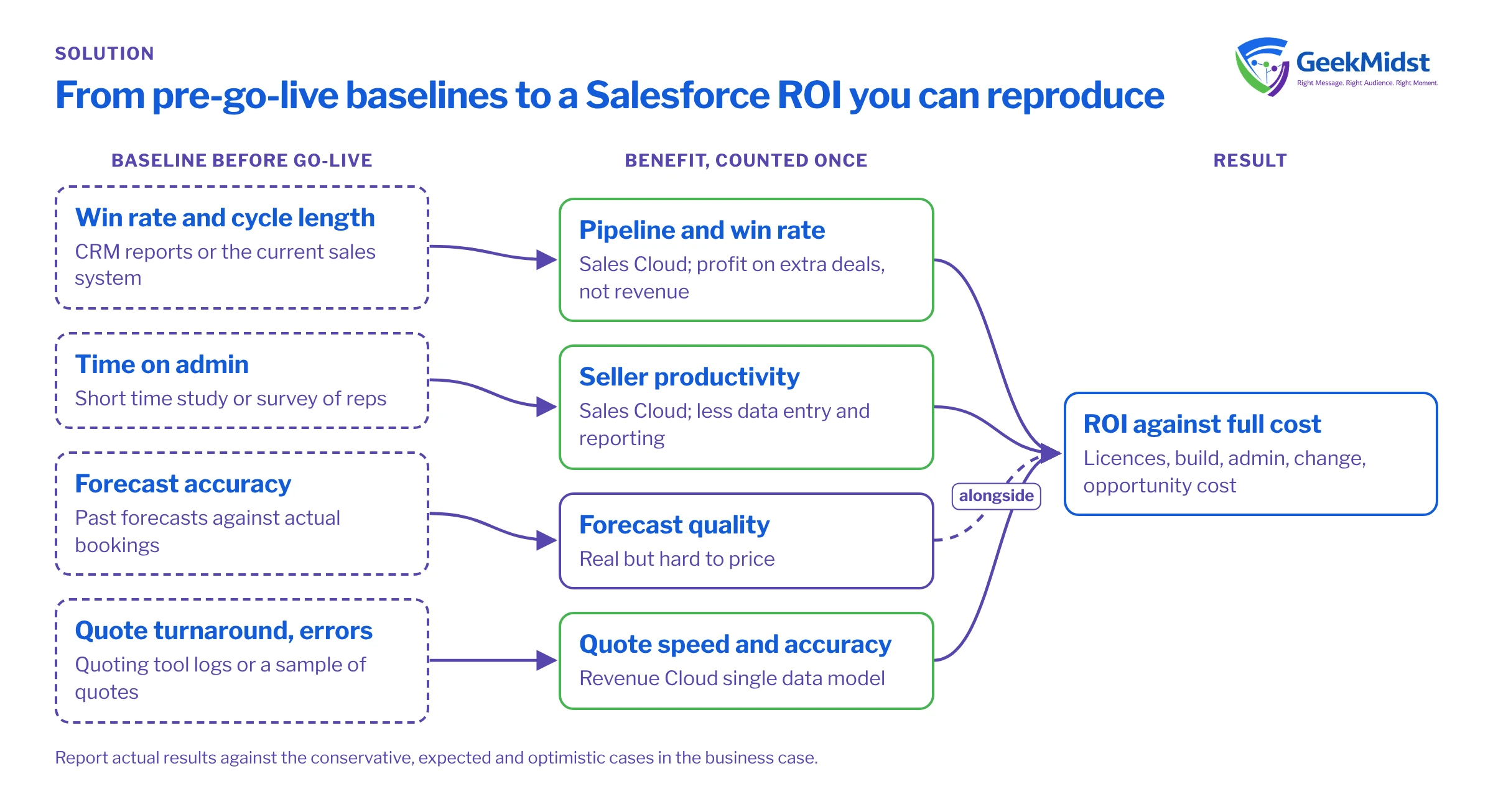
Why Salesforce ROI is hard to pin down
Salesforce rarely creates value on its own. Benefits arrive when people change how they work, when data becomes reliable and when processes are simplified. That makes it easy to credit Salesforce for gains that came from a new sales leader or a price rise, and just as easy to miss real gains because nobody measured the starting point. The answer is to agree what you will measure, how and by whom, before the project starts.
Set baselines before go-live
Capture each baseline over a period long enough to smooth out seasonality, ideally a full quarter or year, and record how it was measured so you can repeat it later.
Baselines worth capturing
| Measure | Where it usually comes from | Why it matters |
|---|---|---|
| Win rate and sales cycle length | CRM reports or the current sales system | Core inputs to any pipeline benefit |
| Forecast accuracy | Past forecasts compared with actual bookings | Shows whether forecasting improves |
| Time on admin and reporting | A short time study or survey of reps and managers | Basis for productivity benefits |
| Quote turnaround and error rate | Quoting tool logs, or a sample of recent quotes | Main Revenue Cloud benefit |
| Billing disputes and revenue leakage | Finance records | Shows the value of a single quote-to-cash model |
| System and admin costs | Contracts and team time sheets | The cost you are replacing or adding |
Benefit categories
Keep each benefit in one category so it is counted once.
Sales Cloud
- Seller productivity: less time on data entry, reporting and preparing proposals. Sales Cloud capabilities such as Momentum, which captures calls, emails and meetings and writes them back to Salesforce, target this directly.
- Pipeline and win rate: better qualification and follow-up. Count the profit on extra deals, not the revenue.
- Forecast quality: fewer surprises at quarter end. This is real but hard to price, so many teams report it alongside the financial case rather than inside it.
Revenue Cloud
- Quote speed and accuracy: Revenue Cloud uses a single data model for pricing, quoting, contracts and billing, with an attribute-based catalogue and Constraint Builder.
- Fewer handoffs and disputes: asset and subscription management and order orchestration reduce rework between sales, operations and finance.
- Scale: the Winter '27 release supports up to 15,000 transaction lines per deal, which matters for complex orders.
- CPQ transition: Salesforce CPQ is end of sale, not end of life, so existing customers can keep using it. A move to Revenue Cloud Advanced is a decision with its own business case; see our CPQ to Revenue Cloud Advanced migration plan.
Count the full cost
- Licences: the edition and any add-ons. Sales Cloud editions changed on 3 September 2026 to Free Suite, Starter Suite, Pro Suite, Core, Advanced and Max. Some capabilities, such as Revenue Intelligence, are add-ons or included only in certain editions, so check placement with your account team. We do not quote prices.
- Implementation: design, build, data migration, integration and testing.
- Admin time: the ongoing work of user management, release testing and small changes. It is often left out of business cases.
- Change and adoption: training, process redesign and the time managers spend coaching.
- Opportunity cost: internal people who are working on the project instead of their usual jobs.
Choosing a measurement approach
| Situation | Approach |
|---|---|
| New Salesforce implementation | Full baseline before launch, then compare like-for-like periods after |
| Adding a product to an existing org | Measure only the processes the new product changes |
| Phased rollout across teams | Compare teams that have gone live with teams that have not yet |
| Small change with a clear owner | A short before-and-after time study is often enough |
Measuring after go-live
- 01
Wait for adoption
Track logins and key actions first; benefits cannot appear before people use the system.
- 02
Repeat the baseline method
Measure each benefit the same way you measured the baseline, over a comparable period.
- 03
Separate other causes
Note price changes, reorganisations and market shifts that could explain the movement.
- 04
Report by scenario
Compare actual results with the conservative, expected and optimistic cases in the business case.
- 05
Act on the gaps
Where a benefit is behind, look at adoption and data quality before blaming the platform.
- 06
Review regularly
Re-run the measurement after each major release or process change.
Measuring results without fake numbers
Do not publish an ROI figure you cannot reproduce. Record the data source and method for every benefit, show the range across scenarios, and be open when a benefit has not arrived yet. A modest, well-evidenced result is more useful to your leadership than a large one nobody can check. Our Salesforce ROI measurement guide includes worksheets for each step, and the business case generator lays out your scenarios for approval.
How GeekMidst can help
We can help set baselines during discovery, design reports that measure each benefit, and review adoption after launch. Our Sales Cloud implementation and Revenue Cloud consulting services include measurement planning.
Questions we hear
Is there an official Salesforce ROI calculator?
How soon after go-live should we measure?
Should licence costs include add-ons?
Can we measure ROI without a baseline?
Sources
Measure Salesforce value properly
We can help you set baselines, define benefits and build the reports that show what changed.


