

Real-Time Personalization, Explained
A practical guide to real-time personalization: how the parts fit together, what real-time actually means on Data 360, and what to have in place before you start.

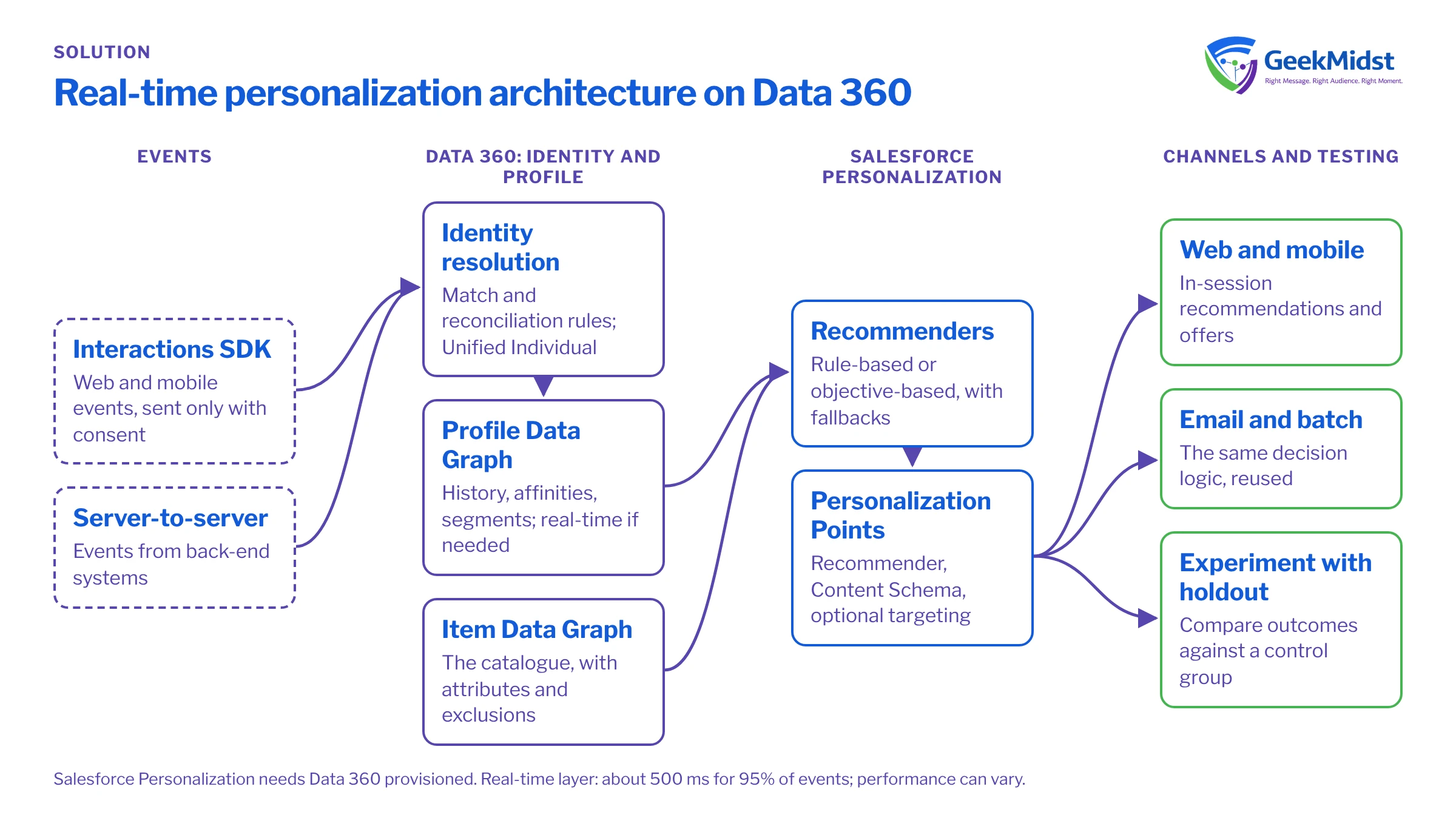
Real-time personalization means changing what a person sees, such as a product row, an offer or a message, based on what they are doing now rather than on last week's export. It depends on four things working together: capturing events as they happen, attaching them to the right person, keeping a profile that can be read in milliseconds, and a decisioning layer that picks the next experience. This guide explains how they fit and what "real-time" means on Salesforce Data 360.
What real-time personalisation means
Think of it as a loop: an event arrives, the profile updates, a decision is made, the experience renders, and the result is measured. Batch personalisation, such as a segment refreshed overnight, suits a weekly newsletter. Real-time matters when the experience should react within the same session, after a search, a viewed category or an abandoned basket. Not every use case needs it. For a plain-language primer, read what is real-time personalization.
How the pieces fit together
On Salesforce, the Salesforce Interactions SDK sends events to Data 360, to Salesforce Personalization, or to both. Identity resolution uses match rules (exact, fuzzy and normalised) and reconciliation rules to build a Unified Individual without altering source data. A Profile Data Graph holds purchase and browse history, affinities and segment membership, and decisions read it at request time, falling back to defaults such as top sellers when a person has no history. More detail is in real-time identity resolution and data graphs.
Components of a real-time personalisation stack
| Component | What it does | Salesforce example | What you decide |
|---|---|---|---|
| Event capture | Records views, searches and basket actions | Salesforce Interactions SDK; server-to-server ingestion | The event model |
| Identity resolution | Links activity to one person | Data 360 match and reconciliation rules | Match keys |
| Profile | Holds what a decision reads | Profile Data Graph; Real-Time Profile Data Graph | Which attributes must be fresh |
| Catalogue | Describes what can be recommended | Item Data Graph | Attributes and exclusions |
| Decisioning | Chooses the item, offer or content | Recommenders and Personalization Points | Objective and fallbacks |
| Delivery and testing | Renders the choice and compares it with a control | Web, mobile, email and batch; experiments | Channels and holdout design |
Engine, platform or implementation service?
A real-time personalization engine, platform and software are often treated as the same thing. They are not. An engine is the decisioning component that picks what to show. A platform adds capture, profiles, identity, consent, channels and testing around it. An implementation service is the work of designing events, mapping data, writing rules and testing. Buying an engine does not give you clean events. We compare the options in real-time personalization engine vs platform.
What "real-time" really means
Salesforce documents that under the Sub-Second Real-Time Profile, "95% of events complete end-to-end ingestion from capture through real-time layer activation within approximately 500 milliseconds". The supported sources are the Web SDK, the Mobile SDK and server-to-server ingestion. Salesforce says performance "can vary", and the page gives no beta or GA label. Real-time data graphs are required for real-time identity resolution, calculated insights, segments and data actions.
The standard path is slower: a standard web or mobile data stream ingests engagement data every 15 minutes and profile data every hour.
Use cases by industry
- Retail and ecommerce: in-session product recommendations based on browsing and basket contents, with top-seller fallbacks for new visitors. See retail.
- Financial services: next-best content for logged-in customers, such as explaining a product they have just researched. Involve compliance early. See financial services.
- Healthcare: appointment reminders and education content. Health data is sensitive: plan for the health privacy rules that apply to you and check with your legal adviser before using it to personalise.
- Travel and hospitality: destination and offer content that follows a search.
- B2B: content recommendations for known contacts, shaped by account and role.
Consent and data requirements
The Interactions SDK sends events only if a person has consented to tracking, and stops at once when consent is revoked. In Marketing Cloud Next, consent is stored as data model objects in Data 360 and checked at send time. On the data side, Salesforce Personalization needs Data 360 provisioned, Profile and Item data graphs, a mapped catalogue, and a Real-Time Profile Data Graph for objective-based recommenders. Record what you collect and why in our consent requirements worksheet, and check your approach with your legal adviser.
Implementation checklist
- 01
Choose two or three use cases
For each, write down the trigger, the decision, the channel and how you will measure it.
- 02
Define the event model
List events, attributes and the pages or screens that send them, and gate tracking on consent.
- 03
Map data and identity
Map sources to data model objects, agree match and reconciliation rules, and test them on real samples.
- 04
Build data graphs
Define profile and item graphs, and use real-time graphs only where a use case needs them.
- 05
Configure decisions
Set recommenders, fallbacks, exclusions and Personalization Points.
- 06
Test before launch
Check rendering, fallbacks, consent withdrawal and response times on a staging site.
- 07
Launch with a holdout
Release to part of your traffic and keep a control group.
- 08
Hand over
Document rules and owners.
Measuring results with holdouts
Keep a random holdout group that sees the default experience, and compare it with the personalised group on the outcome you care about, such as conversion or revenue per visitor. Clicks on a recommendation are not proof of value, because some of those people would have bought anyway. Run each test across a normal buying cycle; Salesforce Personalization supports A/B and multivariate experiments. Read measuring the impact of marketing automation honestly for a wider method.
Limits and prerequisites
- Cold start: new visitors get a fallback. Objective-based recommenders need at least three recorded engagement activities for initial training.
- Licences: Salesforce Personalization and Marketing Cloud Personalization+ both require Data 360 to be provisioned. Salesforce has not published a GA date for Salesforce Personalization; it is sold on the pricing page. The Salesforce real-time personalization page covers licensing.
- Content and ownership: you need enough variants to choose from, and a named owner for rules and fallbacks.
Check where you stand with the data and personalisation readiness check.
Questions we hear
Do we need Data 360 for real-time personalisation on Salesforce?
Is every Data 360 data stream real-time?
How do we prove it works?
Sources
Plan your first real-time use cases
Tell us which experiences you want to personalise and what data you hold. We can scope the event model, data and decisioning with you.


