

Salesforce Real-Time Personalization
How Salesforce Personalization on Data 360 differs from Marketing Cloud Personalization, how MCP+ works, and what the data and licences require.

Salesforce real-time personalization now comes in two products with different architectures. Salesforce Personalization is built natively on the Salesforce Platform and Data 360. Marketing Cloud Personalization (MCP), formerly Interaction Studio and before that Evergage, is built on Marketing Cloud and works independently of other Salesforce products. Salesforce calls Salesforce Personalization "the recommended path forward" for new customers. This page explains how each works, how MCP+ bridges them, and what to check before you commit. For the general concepts, start with our real-time personalization guide.
Two products, two architectures
Salesforce Personalization vs Marketing Cloud Personalization
| Aspect | Salesforce Personalization | Marketing Cloud Personalization |
|---|---|---|
| Built on | Salesforce Platform and Data 360 | Marketing Cloud; described as a standalone, real-time interaction management platform |
| Event capture | Salesforce Interactions SDK with a sitemap and sendEvent | Beacon and Sitemap, plus the Event API for server-side events |
| Profiles | Profile and Item Data Graphs in Data 360 | Profiles in MCP, identified through user identities or attributes such as email |
| Decisioning | Rule-based and objective-based recommenders, delivered through Personalization Points | Einstein Recipes; Einstein Decisions (Premium Edition only); rules-based campaigns |
| Testing | A/B and multivariate tests across web experiences and journeys | Rules-based campaigns and A/B testing |
| Code namespace | SalesforceInteractions | Evergage, which existing customers can keep |
How Salesforce Personalization works on Data 360
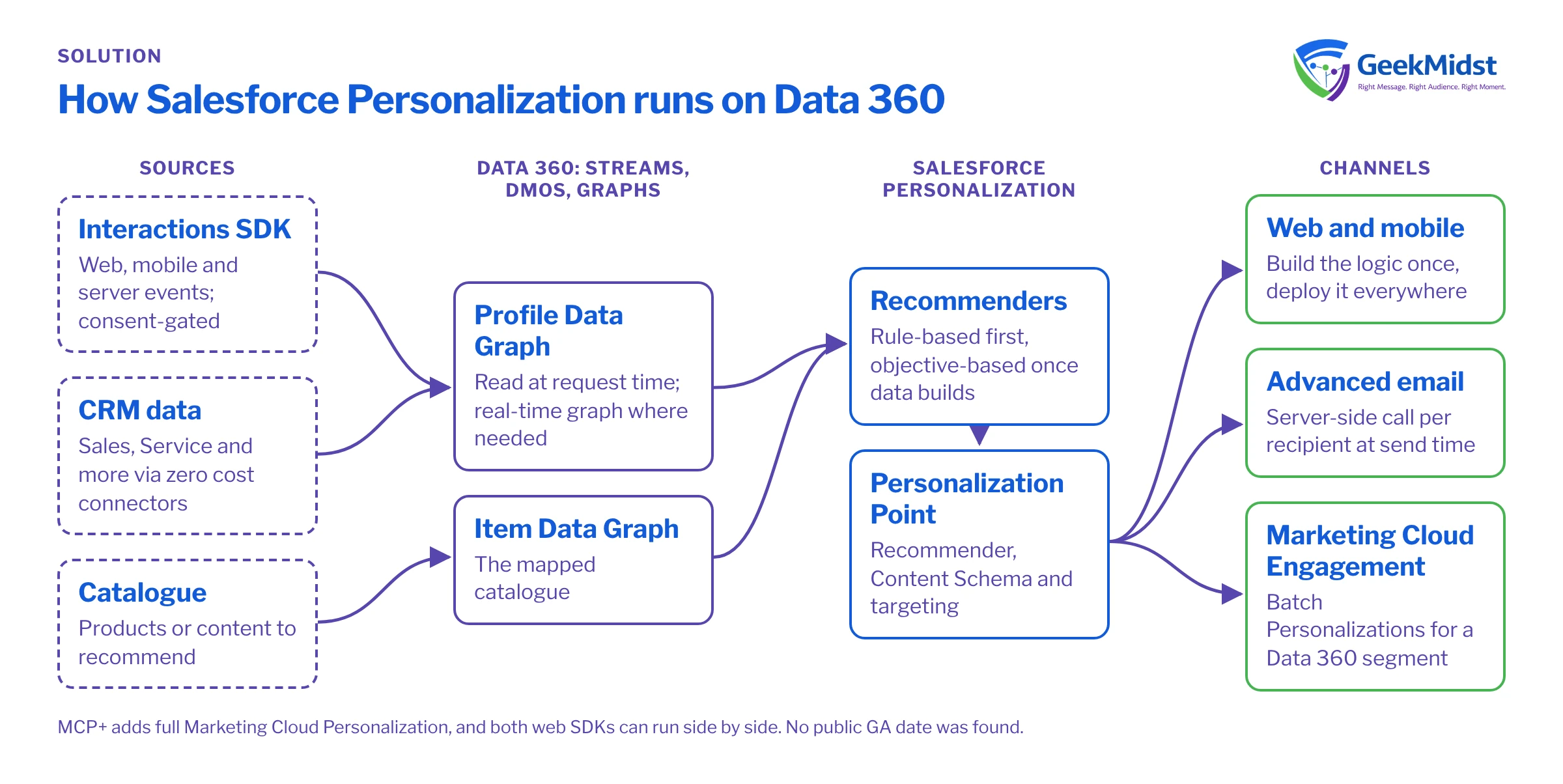
Events from web, mobile and server sources arrive through the Interactions SDK. CRM and other data reach Salesforce Personalization through Data 360: data streams feed data model objects, which feed data graphs. Decisions read the Profile Data Graph at request time and the Item Data Graph for the catalogue. A Personalization Point combines a recommender strategy, a Content Schema (formerly Response Templates) and optional targeting, and it needs either an experiment or one or more Decisions. Salesforce describes this as "build the logic once, deploy it everywhere": the same logic serves web, mobile, email and batch.
The agentic layer's naming is inconsistent: the pricing page lists "Agentforce Personalization Decisioning", while the product page describes a "Get User Intent" action. No status label is given, so confirm availability with Salesforce.
The three-engagement minimum
Recommenders come in two types. Rule-based recommenders sort items by criteria or by calculated insights such as Top Sellers, and need no training. Objective-based recommenders use a deep-learning model that optimises for revenue, clicks or a similar goal. They need a Real-Time Profile Data Graph with engagement history and at least three recorded engagement activities for initial training. So launch with rule-based recommenders, then switch to objective-based models once engagement data builds up. Both types support filters and a Recommender Simulator.
Connections with Marketing Cloud and CRM
- Marketing Cloud Advanced email: the recommender acts as a data source, and the system makes a server-side call per recipient at send time.
- Marketing Cloud Engagement: Batch Personalizations generate decisions in bulk for a Data 360 segment and activate them to Marketing Cloud Engagement for outbound sends.
- CRM: Sales, Service and other CRM sources connect to Data 360 through Salesforce's zero cost connectors, then flow into data graphs.
- Marketing Cloud Personalization: Open Time Email campaigns update content when an email is opened. Salesforce does not document MCP's native Journey Builder or Sales and Service Cloud connectors on a page we could verify, so we confirm those details during discovery.
MCP+ and the path for existing customers
Marketing Cloud Personalization+ (MCP+) includes everything in Salesforce Personalization plus full MCP functionality, with the same allotment of personalisation credits. Existing MCP customers can get Salesforce Personalization by renewing or swapping to MCP+; the Salesforce FAQ says this comes "at no additional cost through the MCP+ SKU". The MCP and Data 360 web SDKs can run side by side on the same site, so you can move use cases in stages rather than all at once. For Marketing Cloud Next, Personalization+ is the path for existing MCP customers, and Salesforce Personalization is offered as an add-on for Growth and Advanced Edition customers.
Which path fits your situation
| Your situation | Likely path |
|---|---|
| New to personalisation, with Data 360 in place or planned | Salesforce Personalization |
| Existing MCP customer with working campaigns | MCP+ at renewal, both SDKs side by side, use cases moved in stages |
| Marketing Cloud Next Growth or Advanced Edition customer | Salesforce Personalization as an add-on |
| Need next-best-offer decisioning for anonymous visitors in MCP | Einstein Decisions, which needs MCP Premium Edition |
Licensing notes
Salesforce sells two SKUs. Salesforce Personalization includes Agentforce Personalization Decisioning; web, mobile app and email personalisation; product and content recommendations; and an allotment of personalisation credits. MCP+ adds full MCP functionality with the same credit allotment. Both are priced per org per month, billed annually, and both need Data 360 provisioned. Salesforce has published no GA date for Salesforce Personalization; it is sold on the pricing page, so treat it as available and confirm the details with your account team. We do not quote prices, because Salesforce says pricing and packaging are subject to change.
Implementation checklist
- 01
Confirm licences
Check Data 360 provisioning, the personalisation SKU and the credit allotment with your account team.
- 02
Choose the product
Use the table above, and record why you chose it.
- 03
Instrument the site
Deploy the Interactions SDK with consent gating, or run it beside the MCP beacon during a move.
- 04
Map the catalogue and profiles
Build the Item and Profile data graphs, and a real-time graph where needed.
- 05
Start with rule-based recommenders
Launch with fallbacks, then add objective-based models once engagement data builds.
- 06
Connect channels
Wire up web first, then email through Advanced Edition or Batch Personalizations.
- 07
Test and measure
Use the Recommender Simulator, then run experiments with a holdout.
Measuring results
Use the built-in experiments to compare personalised and default experiences, and keep a holdout over time so you measure the extra outcome, not just engagement with the personalised content. Report by use case and channel, and record changes to rules so you can explain shifts in results.
How GeekMidst can help
Our Salesforce personalization consulting covers product choice, SDK deployment, data graphs, recommenders and channel set-up. We can also work on the Data 360 foundation through our Data 360 consulting service. The personalization implementation guide sets out the steps in more detail.
Questions we hear
Is Marketing Cloud Personalization being retired?
Can we run both SDKs on one site?
Why are our objective-based recommendations not training?
Sources
Choose the right personalisation path
Tell us what you run today and what you want to personalise. We can map the product, data and licence questions with you.


