

Automated Business Case Generator
Lay out a structured business case from your own inputs and ROI scenarios, then print it or save it as PDF. Nothing is sent to us or to Salesforce.

This automated business case generator turns what you know into a structured draft: the problem, the objectives, the proposed solution, estimated benefits and costs, risks, timeline and success measures. If you used the sales ROI calculator on this device in this visit, its three scenarios are added automatically. You can print the result or save it as PDF from your browser. It does not write to Salesforce and nothing is sent to us.
Business case generator
Fill in what you know. The generator lays it out as a structured business case you can print or save as PDF from your browser. If you used the ROI calculator on this device in this visit, its results are included. Nothing is sent to us.
What the generator produces
The output follows the order most approvers expect: an executive summary, current-state challenges, objectives, the proposed solution, estimated benefits and costs, benefits that are hard to quantify, risks and dependencies, the implementation timeline, success measures, and sources and assumptions. Empty fields are left out, so a short draft stays short. If the ROI calculator has not been used in this visit, the benefits section tells you so and links to it.
The structure of a good business case
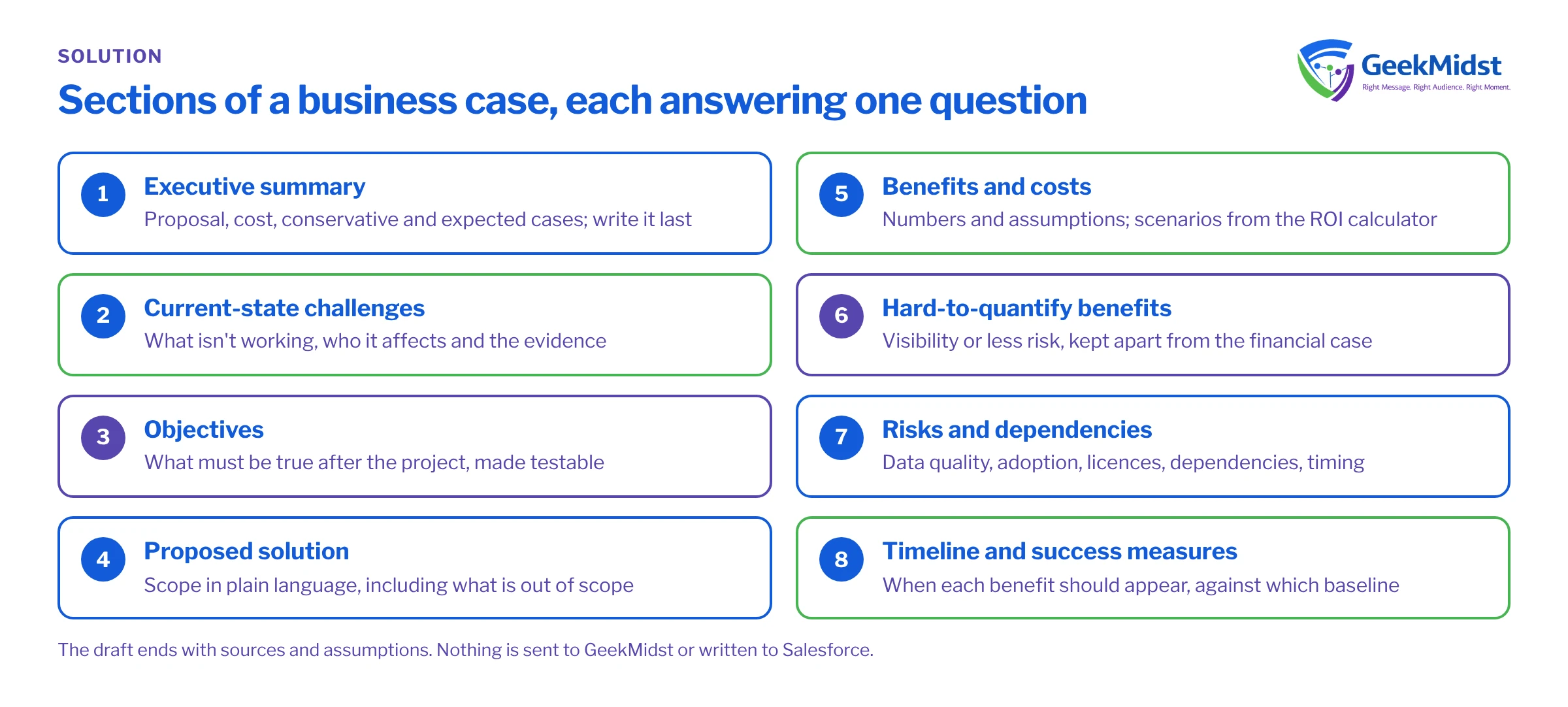
A business case is an argument, not a brochure. Each section should answer one question.
- Executive summary: what you propose, what it costs, and what you expect in the conservative and expected cases. Write it last.
- Current-state challenges: what is not working today, who it affects and how you know. Use evidence, such as hours spent on manual reporting, rather than adjectives.
- Objectives: what must be true after the project. Make them testable.
- Proposed solution: the scope in plain language, including what is out of scope.
- Benefits and costs: the numbers, with the assumptions behind them. Include licences, implementation, internal time, data work, training and ongoing administration.
- Hard-to-quantify benefits: better visibility or less risk are real, but keep them separate from the financial case.
- Risks and dependencies: what could stop the benefits arriving.
- Timeline and success measures: when you expect to see each benefit, and the baseline you will compare against.
How to present scenarios
Show all three scenarios side by side, and lead with the conservative one. Approvers trust a case more when it shows the downside openly. Name the two or three assumptions that drive the difference between scenarios, such as adoption or win-rate change, and say what evidence would move you from one scenario to another. If the conservative case does not pay back, say so and explain why the investment is still worth discussing, or reduce the scope. A phased plan can help: approve a first phase whose conservative case works on its own, and make later phases depend on measured results from the first.
Risks to include
- Data quality: benefits that depend on accurate pipeline or customer data will not arrive if the data is poor.
- Adoption: a new process that reps avoid produces no benefit. Plan training and manager follow-up.
- Licences and packaging: confirm which edition or add-on each capability needs. Salesforce says pricing and packaging are subject to change.
- Dependencies: integrations, other projects and people who are already committed elsewhere.
- Timing: contract renewal dates, peak trading periods and release windows.
What the generator does not do
It does not write to Salesforce, connect to your org or send your inputs to GeekMidst. It does not check your figures or produce a quote. It lays out what you give it, so the quality of the output depends on the quality of the inputs. Before you circulate it, have someone from finance review the assumptions.
After approval: track the benefits
An approved business case is a set of promises, so give each one an owner. Turn the success measures into reports before go-live, record the baseline, and agree when you will review results against the conservative and expected scenarios. If a benefit falls behind, look first at adoption and data quality, then at the assumption itself. Updating the case openly is better than defending numbers that no longer hold. Keep the original version too, so later reviews can see what was assumed at the time and what changed since.
Use the template if you prefer a document
If your organisation has its own format, or you want to work offline with colleagues, use our sales business case template. It follows the same structure. For measuring Salesforce benefits after go-live, read Salesforce ROI analysis and the Salesforce ROI measurement guide.
Questions we hear
Does the generator save my business case?
Why are my ROI figures missing?
Does it create records in Salesforce?
Can GeekMidst review the draft?
Sources
Need help shaping the scope?
Tell us what you want to build and why. We can help you turn the business case into a realistic Salesforce plan.


