

Salesforce Forecasting and Revenue Intelligence
How Pipeline Forecasting, Einstein Forecasting, Pipeline Inspection and Revenue Intelligence fit together in Sales Cloud, and what each one needs.

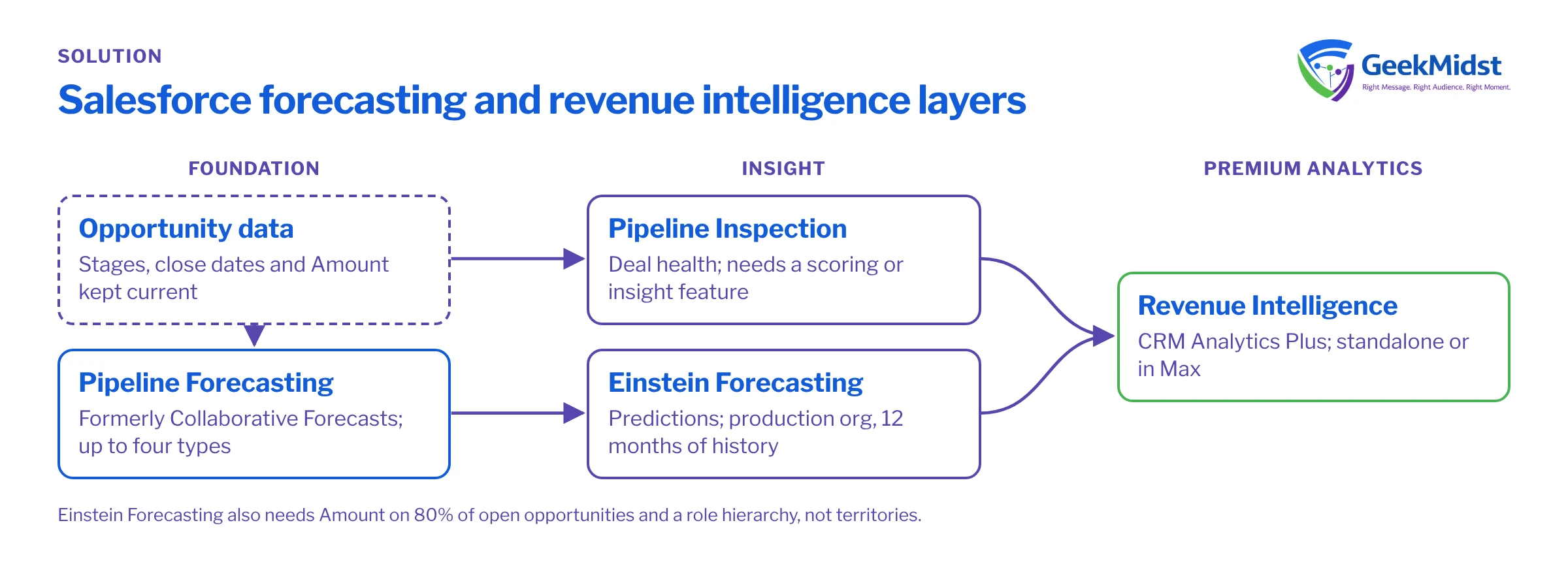
Salesforce revenue intelligence is not one feature. It is a set of layers in Sales Cloud: Pipeline Forecasting for the numbers, Einstein Forecasting for predictions, Pipeline Inspection for deal health, and Revenue Intelligence as a premium analytics offering on top. Each has its own prerequisites, and some depend on edition or add-on licences. This page explains how they fit, what each needs, and where Salesforce's documentation leaves edition placement unconfirmed.
The problem
Most forecasting problems are not about software. Reps update opportunities late, managers adjust numbers in spreadsheets, and nobody trusts the roll-up. Adding prediction or analytics on top of poor data produces confident-looking wrong answers. So the order matters: fix the forecast foundation first, then add insight.
How the layers fit together
Pipeline Forecasting is what Salesforce Help now calls the forecasting feature; Trailhead and some prerequisites still say "Collaborative Forecasts". A Salesforce Ben summary of the Winter '27 release notes describes Pipeline Forecasting as regular forecasting renamed, with deal risks, methodology scores, contact insights and activity heatmaps added to the forecast pipeline view. That summary is a third-party source, so check Help for current detail. Each forecast type is defined by an object, a measure, a date field and a hierarchy, and you can have up to four active forecast types. The forecast hierarchy is based on the role hierarchy, but users must be enabled and forecast managers assigned. Quotas are set per user, period and forecast type.
Einstein Forecasting adds predictions, shown in an "Einstein Prediction" column. It has not been retired: a Help article published on 28 May 2026 documents its current activation. Do not confuse it with Einstein Close Date Predictions, which a third party reports was retired around Spring '25.
Pipeline Inspection shows deal health: Einstein Opportunity Scoring in High, Medium and Low tiers, Einstein Deal Insights, 7-day and 30-day activity metrics, and a stakeholder panel.
Revenue Intelligence combines Sales Cloud with CRM Analytics Plus. It includes Einstein Opportunity Scoring and Deal Health Insights, Collaborative and Predictive Forecasting, Pipeline Inspection and Flow, Revenue Insights dashboards, Einstein Account Management, Analytics Studio, Einstein Discovery and Prediction Builder.
Forecasting and revenue intelligence components
| Component | What it does | Key prerequisites |
|---|---|---|
| Pipeline Forecasting | Rolls up opportunities into forecasts by type, period and hierarchy | Forecast types defined, users enabled, forecast managers assigned |
| Einstein Forecasting | Adds predicted forecast values | See the prerequisites list below; production org only |
| Pipeline Inspection | Shows deal health, changes and activity | Insights need Conversation Intelligence, Einstein Deal Insights, Einstein Email Insights or Einstein Opportunity Scoring |
| Revenue Intelligence | Premium analytics, dashboards and predictive tools | Sold standalone or included in Max edition |
Einstein Forecasting prerequisites
Salesforce's Help article lists these requirements:
- Collaborative Forecasts enabled, with a User Role hierarchy. Territory forecasts are not supported.
- The Opportunity Revenue forecast type, using the standard Amount field.
- At least one forecasting user who reports to a forecast manager, and a Gregorian fiscal year.
- A production org. It is not available in sandboxes.
- The Sales Cloud Einstein permission set licence, which installs the OIQ_Integration managed package.
- At least 12 months of Opportunity history, with Amount populated on at least 80% of open opportunities.
Edition and licence placement
Since 3 September 2026, Sales Cloud editions are Free Suite, Starter Suite, Pro Suite, Core, Advanced and Max. Salesforce's pricing page says Core includes "advanced pipeline management and forecasting, opportunity scoring, conversation intelligence", that Predictive Forecasting is "available for purchase" on Core, and that Max includes "our full suite of AI". Revenue Intelligence is sold standalone or included in Max, and the Australian pricing page also lists it as a paid add-on.
Where to start
| If this is your situation | Start with |
|---|---|
| Managers do not trust the roll-up | Pipeline Forecasting set-up, hierarchy and data hygiene |
| Forecast is trusted but deals slip late | Pipeline Inspection and activity capture |
| You have clean history and want predictions | Einstein Forecasting, after checking the prerequisites |
| You need deep analytics across teams and products | Revenue Intelligence, after confirming licences |
Implementation checklist
- 01
Audit opportunity data
Check stages, close dates and Amount completeness against the Einstein Forecasting thresholds.
- 02
Review the role hierarchy
Make sure it matches how forecasts roll up, and assign forecast managers.
- 03
Define forecast types
Choose the object, measure, date field and hierarchy for each, up to four active types.
- 04
Load quotas
Set quotas per user, period and forecast type.
- 05
Turn on insight features
Enable the scoring or insight features that Pipeline Inspection depends on.
- 06
Add predictions or analytics
Activate Einstein Forecasting or Revenue Intelligence once licences and prerequisites are confirmed.
- 07
Train managers
Agree a weekly forecast call that uses the same views everyone sees.
Measuring results
Compare forecasts made at fixed points in each quarter with actual bookings, and track how that gap changes over several quarters. Also track how often opportunities are updated and how late deals slip. Keep the method the same each time, and note changes in sales leadership or territory that could affect the comparison.
How GeekMidst can help
Our Salesforce sales forecasting consulting covers forecast design, data clean-up and Einstein Forecasting readiness. For broader set-up, see Sales Cloud implementation, and for dashboards, Tableau and CRM Analytics consulting. Read Salesforce forecasting explained for background.
Questions we hear
Has Einstein Forecasting been retired?
Can we test Einstein Forecasting in a sandbox?
Is Revenue Intelligence included in our edition?
Is Pipeline Forecasting a new product?
Sources
Get a forecast your team trusts
Tell us how you forecast today. We can review your data, hierarchy and licences and suggest a sensible order of work.


