

Connecting Webinar Platforms to Salesforce
Vendor-neutral patterns for connecting webinar and event platforms to Salesforce: registrations, attendance, follow-up journeys and consent.

Webinars and online events produce some of the best intent data a marketing team has: who registered, who turned up, how long they stayed, and what they asked. Too often that data stays inside the webinar tool, or arrives in Salesforce as a spreadsheet a week later. By then the follow-up is stale.
This article sets out vendor-neutral patterns for connecting any webinar or event platform to Salesforce. We don't name or rank webinar products. The patterns apply whichever one you use.
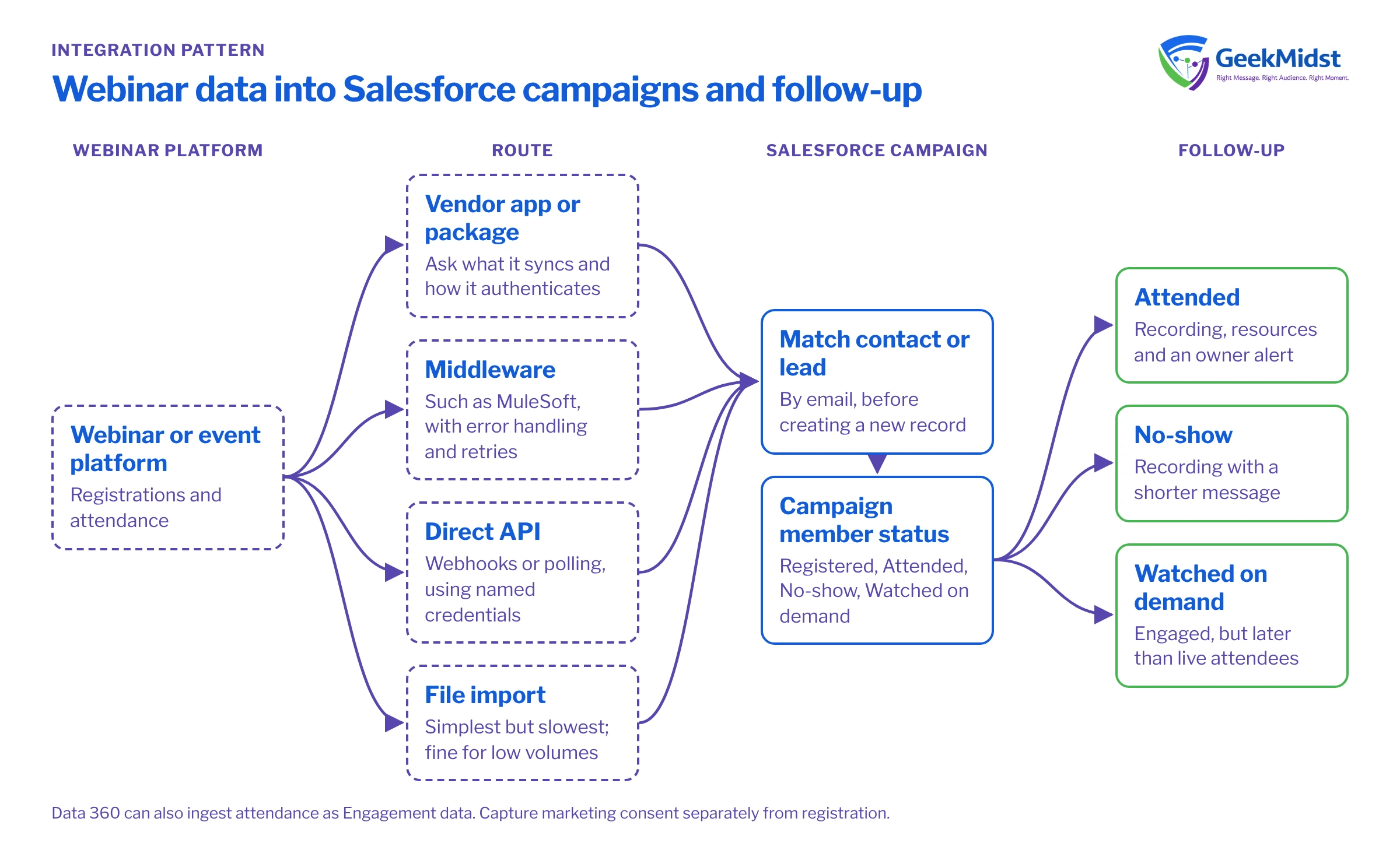
What a good integration does
A complete integration covers four flows:
- Registrations reach Salesforce and attach to the right campaign and person.
- Attendance updates each person's status after the event.
- Follow-up journeys start automatically, based on that status.
- Consent is captured once and respected everywhere.
Ways to connect
Most webinar platforms offer one or more of these routes. Check each vendor's documentation for what they actually support.
- A vendor-supplied app or package. Some vendors offer an AppExchange listing or a managed package. Ask what it syncs, how often, and how it authenticates. Our article on Salesforce native integrations lists the questions to ask.
- Middleware. An integration platform such as MuleSoft (Anypoint Platform, or MuleSoft Composer, which is still documented) can map webinar data to Salesforce objects with error handling and retries.
- Direct API integration. Your own code receives the platform's webhooks or polls its API, then writes to Salesforce. Use proper credentials, covered in named credentials and external credentials explained.
- File import. A scheduled export and import. It is the simplest route but the slowest, and fine for low volumes.
- Data 360 ingestion. If you use Data 360, attendance can arrive as Engagement data with an Event Time field, alongside other behavioural data.
Pattern 1: registrations into campaigns
Create one Salesforce campaign per event (or per session for a series). When someone registers:
- Match the person. Look up an existing contact or lead by email before creating a new one. Duplicates here multiply quickly.
- Add them as a campaign member with a status such as "Registered".
- Keep the source. Store which form, ad or email drove the registration, so attribution works. See connected campaigns and attribution basics.
If registration happens on your own site rather than the webinar platform, a Marketing Cloud Engagement CloudPage can host the form. Salesforce documents a Smart Capture block for collecting form data, and a CloudPagesForm Submit Event that can start a journey.
Pattern 2: attendance status
After the event, update each member's status. Agree the list up front; a common set is Registered, Attended, No-show and Watched on demand. Two design choices matter:
- Timing. Pull attendance shortly after the event ends, then again later to catch on-demand viewers.
- Detail. Decide whether to store duration, poll answers or questions. Keep only what you will use, and only with a lawful basis.
Campaign member statuses are standard Salesforce functionality; check Salesforce Help for how to configure them for your campaign types.
Pattern 3: follow-up journeys
Status changes should drive follow-up without manual work:
- Attended: send the recording and resources, and alert the account owner for high-fit accounts.
- No-show: send the recording with a shorter message.
- Watched on demand: treat as engaged, but later than live attendees.
In Marketing Cloud Engagement, Marketing Cloud Connect enables Journey Builder activities in CRM, and its API user handles entry events and triggered sends. In Account Engagement, automation rules and completion actions can respond to campaign status; see automation rules, completion actions and dynamic lists. In Marketing Cloud Next, Flow is the orchestration tool. Our event registration and reminder journey blueprint covers the reminder sequence before the event.
Pattern 4: consent
Registering for a webinar is not the same as agreeing to marketing. Treat them separately:
- Capture consent explicitly on the registration form, per channel, with clear wording.
- Store it where sends check it. In Marketing Cloud Next, consent lives as DMOs in Data 360, including Communication Subscription Consent per contact point, subscription and channel, and is checked at send time.
- Sync it back to CRM and any other sending tool. See consent synchronisation across CRM and marketing.
- Plan for the privacy rules in each country you market to, and check the wording with your legal adviser.
Integration checklist
- 01
Define statuses
Agree campaign member statuses and what each one triggers.
- 02
Choose the route
Package, middleware, direct API, file import or Data 360 ingestion.
- 03
Map fields
Decide which webinar fields map to which Salesforce fields, and which you won't store.
- 04
Handle matching
Set rules for finding existing contacts and leads before creating records.
- 05
Capture consent
Add explicit, per-channel consent to the registration form.
- 06
Build follow-ups
Create journeys or automation rules for each status.
- 07
Test end to end
Register, attend, skip and watch on demand with test records, then check every record and message.
Questions we hear
Which webinar software works best with Salesforce?
Should webinar registrations create leads or contacts?
Is registering for a webinar the same as marketing consent?
How quickly should attendance reach Salesforce?
Sources
Connect your events to Salesforce
We can design the data flow from your webinar platform into campaigns, journeys and consent records, whichever platform you use.


