

Salesforce Forecasting Explained
Pipeline Forecasting, Collaborative Forecasts, Einstein Forecasting, Pipeline Inspection and Revenue Intelligence, untangled, with Einstein Forecasting's requirements.

Salesforce forecasting has collected a lot of names: Collaborative Forecasts, Pipeline Forecasting, Einstein Forecasting, Predictive Forecasting, Pipeline Inspection and Revenue Intelligence. Some are the same thing renamed, some are add-ons, and one similar-sounding feature has been retired. That confusion leads teams to switch off things that still work, or to plan around things they haven't licensed.
This article sorts out the names, then covers the forecasting basics, Einstein Forecasting's requirements, Pipeline Inspection and Revenue Intelligence.
The names, sorted
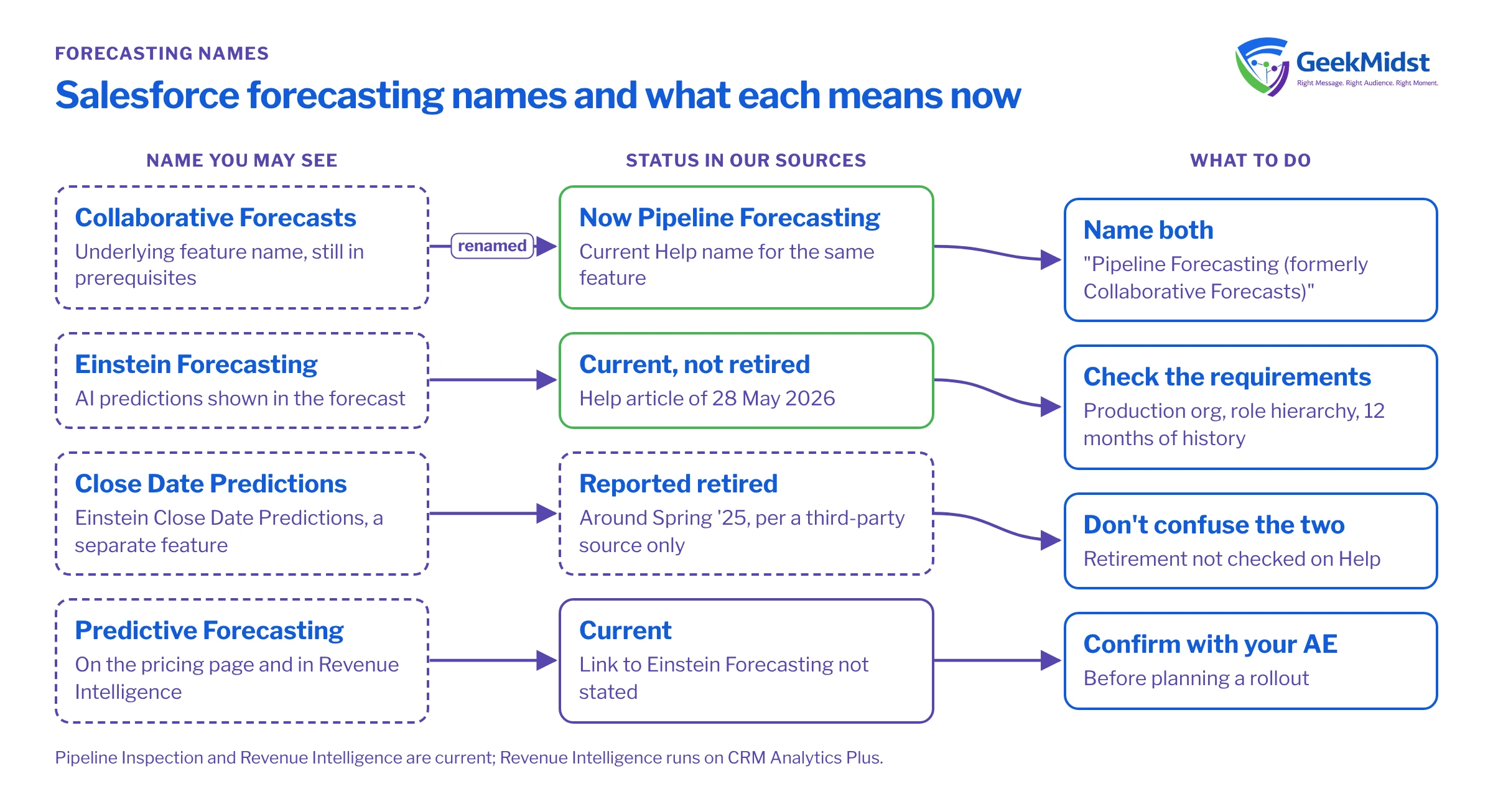
Salesforce forecasting names and status
| Name | What it is | Status in our sources |
|---|---|---|
| Pipeline Forecasting | The current Help name for Salesforce forecasting | Current; described as a rebranded Forecasts in Winter '27 |
| Collaborative Forecasts | The underlying feature name, still used in prerequisites | Current |
| Einstein Forecasting | AI predictions shown in the forecast | Current; not retired |
| Einstein Close Date Predictions | A separate prediction feature | Retired around Spring '25, per a third-party source only |
| Predictive Forecasting | Named on the pricing page and in Revenue Intelligence | Current; relationship to Einstein Forecasting not stated |
| Pipeline Inspection | A view of pipeline changes and deal health | Current |
| Revenue Intelligence | Premium analytics offering on CRM Analytics Plus | Current |
Pipeline Forecasting and Collaborative Forecasts
Salesforce Help navigation now uses "Pipeline Forecasting", and the implementation guide is titled the Pipeline Forecasting Implementation Guide. Salesforce Ben summarises it as "just regular Forecasting, renamed!", and reports that Winter '27 adds deal risks, methodology scores, contact insights and activity heatmaps to the forecast pipeline view. That detail is third-party reporting.
"Collaborative Forecasts" is still the name used for the underlying feature, including in Einstein Forecasting's prerequisites. The safest wording is "Pipeline Forecasting (formerly Collaborative Forecasts)".
How forecasts are built
- Forecast types. Each type is defined by an object (for example Opportunity), a measure (for example Amount), a date field (for example Close Date) and a hierarchy. You can have up to four active forecast types.
- Hierarchy. The forecast hierarchy is based on the role hierarchy, but users must be enabled for forecasting and forecast managers assigned.
- Quotas. Set per user, per period and per forecast type.
Einstein Forecasting: not retired
Einstein Forecasting is often assumed to be gone. It isn't. A Salesforce Help article published on 28 May 2026, "Einstein Forecasting: Activation Requirements & Common Setup Failures", documents current setup with no retirement notice. In Pipeline Forecasting, Einstein predictions appear in an "Einstein Prediction" column with a slide-out panel.
The feature that was retired is Einstein Close Date Predictions, around Spring '25. That comes from a third-party source and we have not checked it on Help, so treat it as unconfirmed. Don't confuse the two.
Einstein Forecasting requirements (Help, May 2026)
- 01
Collaborative Forecasts
Enabled, using a User Role hierarchy. Territory forecasts aren't supported.
- 02
Forecast type
The Opportunity Revenue forecast type, using the standard Amount field.
- 03
Users
At least one forecasting user reporting to a forecast manager.
- 04
Fiscal year
A Gregorian fiscal year.
- 05
Org
A production org only. It isn't available in sandboxes.
- 06
Licence
The Sales Cloud Einstein permission set licence, which installs the OIQ_Integration managed package.
- 07
History
At least 12 months of Opportunity history, with Amount populated on at least 80% of open opportunities.
Most setup failures map to one of these lines. Common ones are trying it in a sandbox first, using territory-based forecasts, or having patchy Amount values on open opportunities. Fix the data before you blame the model.
Pipeline Inspection
Pipeline Inspection shows how the pipeline is changing and how healthy deals look. Salesforce's Trailhead content lists:
- Einstein Opportunity Scoring in tiers: High (67–99), Medium (34–66) and Low (1–33).
- Einstein Deal Insights.
- Activity metrics over 7 and 30 days.
- A stakeholder panel.
The side-panel insights need at least one of Conversation Intelligence, Einstein Deal Insights, Einstein Email Insights or Einstein Opportunity Scoring. Salesforce Help only links to "View supported editions", so check that page for your edition.
Revenue Intelligence
Revenue Intelligence is a premium analytics offering that combines Sales Cloud with CRM Analytics Plus. Salesforce lists Einstein Opportunity Scoring and Deal Health Insights, Collaborative and Predictive Forecasting, Pipeline Inspection, Revenue Insights dashboards, Einstein Account Management, Analytics Studio, Einstein Discovery and Prediction Builder. There is a "with Tableau" variant and industry variants. It is sold standalone or included in Max edition.
Which edition gives you what
Since 3 September 2026, Sales Cloud editions are Free Suite, Starter Suite, Pro Suite, Core, Advanced and Max. Salesforce positions Core against legacy Enterprise, Advanced against legacy Unlimited, and Max against the Agentforce 1 Edition. The pricing page says Core includes "advanced pipeline management and forecasting, opportunity scoring, conversation intelligence", that Predictive Forecasting is "Available for purchase" on Core, and that Max includes "our full suite of AI".
Two cautions. The pricing grid's feature check marks could not be confirmed, and Salesforce doesn't say whether Predictive Forecasting is the same as Einstein Forecasting. Confirm both with your account executive before you plan a rollout. We don't quote prices.
Getting forecasting right
Forecast tools only reflect the process behind them. Agree stage definitions and close-date discipline first, then configure forecast types, then add AI. Our forecasting and revenue intelligence blueprint lays out the sequence, and our sales forecasting consulting team can help you set it up. For the wider Sales Cloud picture, see Sales Cloud implementation and our Sales Cloud product overview.
Questions we hear
Has Einstein Forecasting been retired?
Can I test Einstein Forecasting in a sandbox?
Is Pipeline Forecasting a new product?
Is Pipeline Inspection part of Revenue Intelligence?
Sources
Make your forecast trustworthy
We can review your forecast setup, data quality and licences, and plan a path to AI-assisted forecasting.


