

Salesforce ROI Measurement Guide
How to measure Salesforce ROI honestly: baselines before launch, complete benefit and cost categories, attribution pitfalls, and a post-go-live review cycle.

Most Salesforce business cases are approved on projected returns, and few are checked afterwards. When they are, the measurement often falls apart: no baseline was captured, costs were incomplete, or a benefit was credited to Salesforce that came from something else. This guide sets out how to measure Salesforce ROI so the result stands up to a finance review.
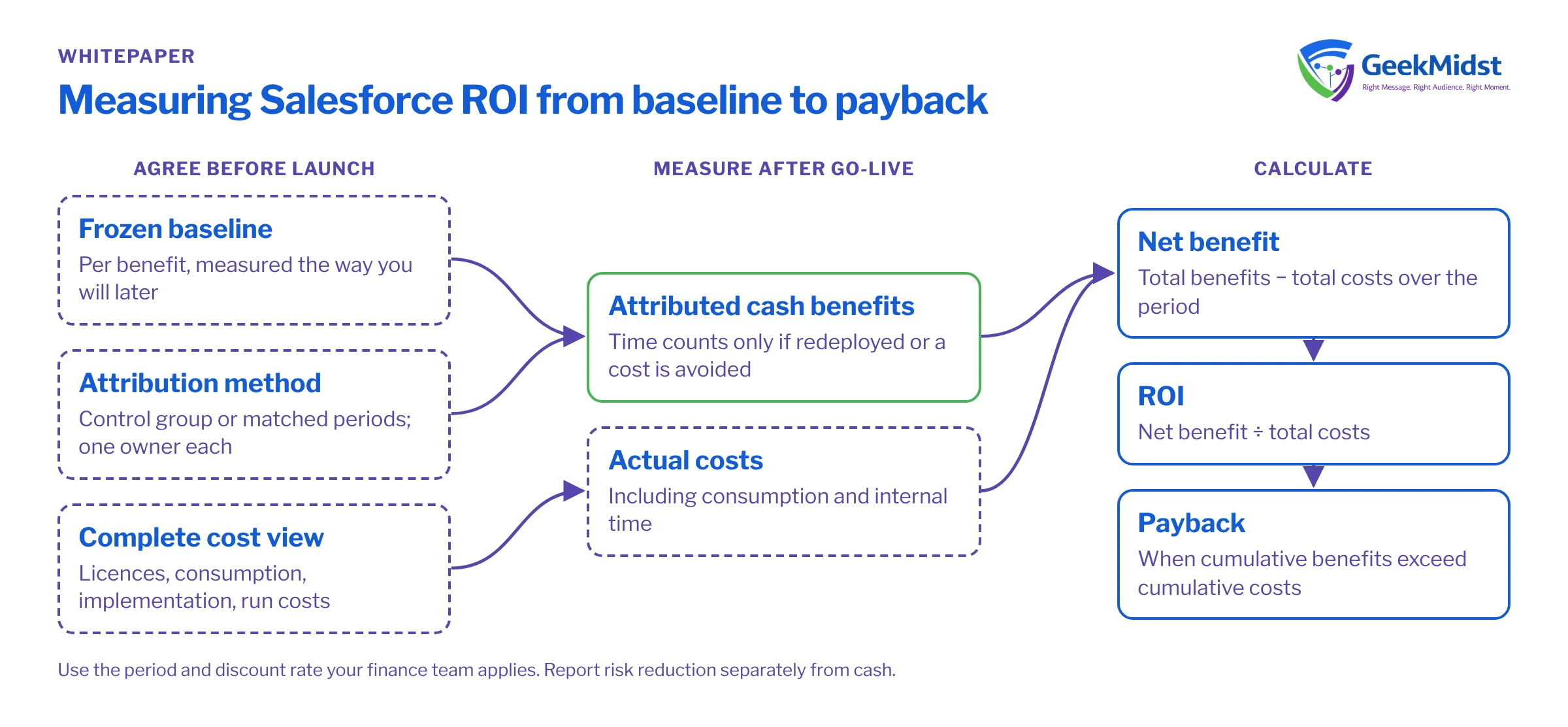
1. The measurement model
ROI measurement needs four things, agreed before launch:
- A baseline for each benefit, measured the same way you will measure it later.
- A complete cost view, including internal time and running costs.
- An attribution method that separates the effect of Salesforce from other changes.
- A review cycle with owners and dates.
The arithmetic is the easy part. Net benefit is total benefits minus total costs over the period, ROI is net benefit divided by total costs, and payback is the point at which cumulative benefits exceed cumulative costs. Use the period and discount rate your finance team applies to other investments. To model the figures, use the sales ROI calculator, and to frame them for approval, the sales business case template.
2. Baselines
A benefit without a baseline is a claim. Capture baselines before any change reaches users, from the systems of record, over a window long enough to smooth out seasonality.
Baseline examples
| Area | Baseline metric | Typical source | Window |
|---|---|---|---|
| Sales productivity | Selling hours per seller per week; admin time | Activity data, time studies | One quarter or more |
| Pipeline | Win rate, average deal size, sales cycle length | CRM reports | Twelve months, to cover seasonality |
| Forecasting | Forecast accuracy against actuals | Forecast snapshots and finance actuals | Several quarters |
| Service | Average handling time, first-contact resolution, cost per case | Service reports, workforce data | One quarter or more |
| Marketing | Conversion rates by stage, cost per acquisition | Marketing and CRM reports | Matched campaign periods |
| Operations | Hours spent on manual reporting or re-keying | Time studies | A representative month |
If forecast accuracy is a benefit you plan to claim from Einstein Forecasting, note that Salesforce's Help article lists at least 12 months of opportunity history, with Amount filled in on at least 80% of open opportunities, among its requirements. That history is also your baseline, so protect it during any migration.
3. Benefit categories
Benefit categories
| Category | Examples | Evidence needed | Cash or time |
|---|---|---|---|
| Revenue growth | Higher win rate, larger deals, faster cycles | Before-and-after metrics with a control | Cash, once attributed |
| Productivity | Less admin, faster case handling | Time studies and activity data | Time, unless redeployed or avoided headcount |
| Cost avoidance | Retired systems, avoided hires | Contracts ended, hiring plans | Cash |
| Risk reduction | Fewer compliance errors, better data quality | Incident and audit records | Usually not cash; report separately |
| Customer experience | Higher satisfaction, lower churn | Survey and retention data with a control | Cash only if churn is valued |
Keep cash and time benefits in separate columns. Time saved becomes cash only when it is redeployed into measurable work, such as more selling hours, or when it avoids a cost you would otherwise have paid.
4. Cost categories
Costs are usually understated, because the licence line is visible and everything else is not.
Cost categories
| Category | What to include | Note |
|---|---|---|
| Licences and editions | User licences, editions and add-ons | Salesforce states pricing and packaging are subject to change; date-stamp every figure |
| Consumption | Agentforce usage, Data 360 credits, messaging credits | Agentforce is offered with Flex Credits, Resolutions or per-user licensing; Marketing Cloud Next tracks messaging-credit spend in a Digital Wallet |
| Implementation | Partner or contractor fees, internal project team | Count internal time at a loaded rate |
| Integration and data | Middleware, integration build, data migration | Include ongoing integration support |
| Training and change | Course design, training time, champions | Time away from work is a cost |
| Run and support | Administration, support, release testing | Recurring every year |
5. Attribution pitfalls
Attribution is where honest measurement usually goes wrong. These are the pitfalls to check for:
- Double counting. The same revenue credited to Salesforce, a new pricing policy and a marketing campaign. Agree one owner for each benefit.
- Seasonality and market shifts. Comparing a strong quarter after launch to a weak one before. Use matched periods and, where possible, a control group.
- Selection bias. Comparing early adopters with everyone else. Early adopters are often stronger performers to begin with.
- Inflated engagement. Automated opens can make email look more effective than it is. Marketing Cloud Next includes Metrics Guard for bot filtering among its Einstein email features; check what your reporting excludes.
- Last-touch bias. Giving all credit to the final interaction. Intelligence+ in Marketing Cloud Next adds Flexible Attribution, which Salesforce lists as GA since October 2025.
- Counting time as cash. See the benefit categories above.
- Ignoring the ramp. Benefits rarely start at go-live. Measure against the ramp you planned, not against full-adoption targets in the first month.
Use controlled tests where you can
The most convincing evidence is a controlled comparison. Some Salesforce features have this built in. In Marketing Cloud Engagement, for example, Send Time Optimization can be tested in a Path Optimizer split of no STO, STO and random. Salesforce Personalization supports A/B and multivariate tests with automatic cohort assignment. Where a feature lacks a built-in test, hold back a comparable group and compare outcomes. See measuring the impact of marketing automation honestly.
6. Measuring after go-live
Post-go-live measurement cycle
- 01
Confirm the baseline
Before launch, freeze the baseline figures and how each was calculated.
- 02
Track adoption first
In the first month, measure logins, records created and key fields completed. Benefits cannot appear without usage.
- 03
First benefit review
At around 90 days, compare leading indicators, such as activity and stage conversion, against baseline.
- 04
Full review
At six and twelve months, measure each benefit with the agreed method and attribution approach.
- 05
Update the cost view
Add actual costs, including consumption and internal time, not just the original estimate.
- 06
Report and decide
Report net benefit, ROI and payback against the business case, and decide what to change or extend.
Keep a benefits register for every benefit in the business case. It turns ROI from a one-off claim into a habit, and it makes the next business case easier to approve.
Benefits register fields
| Field | What to record |
|---|---|
| Benefit | A plain description, such as "shorter sales cycle for mid-market deals" |
| Owner | The business owner who can explain changes in the metric |
| Metric and method | The exact report or calculation, including filters and period |
| Baseline | The frozen pre-launch value and the window it covers |
| Target and ramp | The expected value at each review date, not only the end state |
| Attribution approach | Control group, matched period or test design used |
| Latest result | The measured value, date and any caveats |
| Cash or time | Whether the benefit counts towards cash return |
Who owns what
The sponsor owns the overall result. Each benefit needs a business owner who can explain changes in its metric, and finance should agree the method before the first review, not after. The Salesforce team provides the reports, but should not be the only voice reporting its own success.
7. Measurement readiness checklist
- Baselines captured and frozen, with methods documented.
- Costs listed across all six categories, with dates and sources.
- An attribution method agreed for each benefit, with control groups where possible.
- Adoption metrics reported from week one.
- Review dates in the calendar, with named owners.
For a structured analysis of an existing org, see Salesforce ROI analysis and how to build a sales ROI model.
Questions we hear
We did not capture a baseline. Can we still measure ROI?
How soon after go-live should we report ROI?
Should we use the Salesforce ROI calculators?
Who should sign off the ROI figures?
Sources
- https://salesforce.com/uk/agentforce/ai-agents-roi-calculator
- https://www.salesforce.com/agentforce/ai-agents-roi-report/
- https://salesforce.com/blog/marketing-cloud-next-details/
- https://trailhead.salesforce.com/content/learn/modules/ai-in-marketing-cloud-next/boost-your-marketing-campaigns-with-einstein
- https://help.salesforce.com/s/articleView?id=005321979&language=en_US&type=1
Want to measure your Salesforce return?
We can help you set baselines, build the cost view and set up a benefits register before or after go-live.


