

Data 360 Architecture Guide
How Data 360 fits together, layer by layer: ingestion, DLOs and DMOs, identity resolution, calculated insights, activation, zero copy status and consent.

Data 360, formerly Data Cloud, is Salesforce's layer for bringing customer data together, unifying it and making it usable in CRM, marketing, analytics and AI agents. This guide walks through the Data 360 architecture layer by layer, explains the decisions you make at each step, and marks the status of newer capabilities as Salesforce states it.
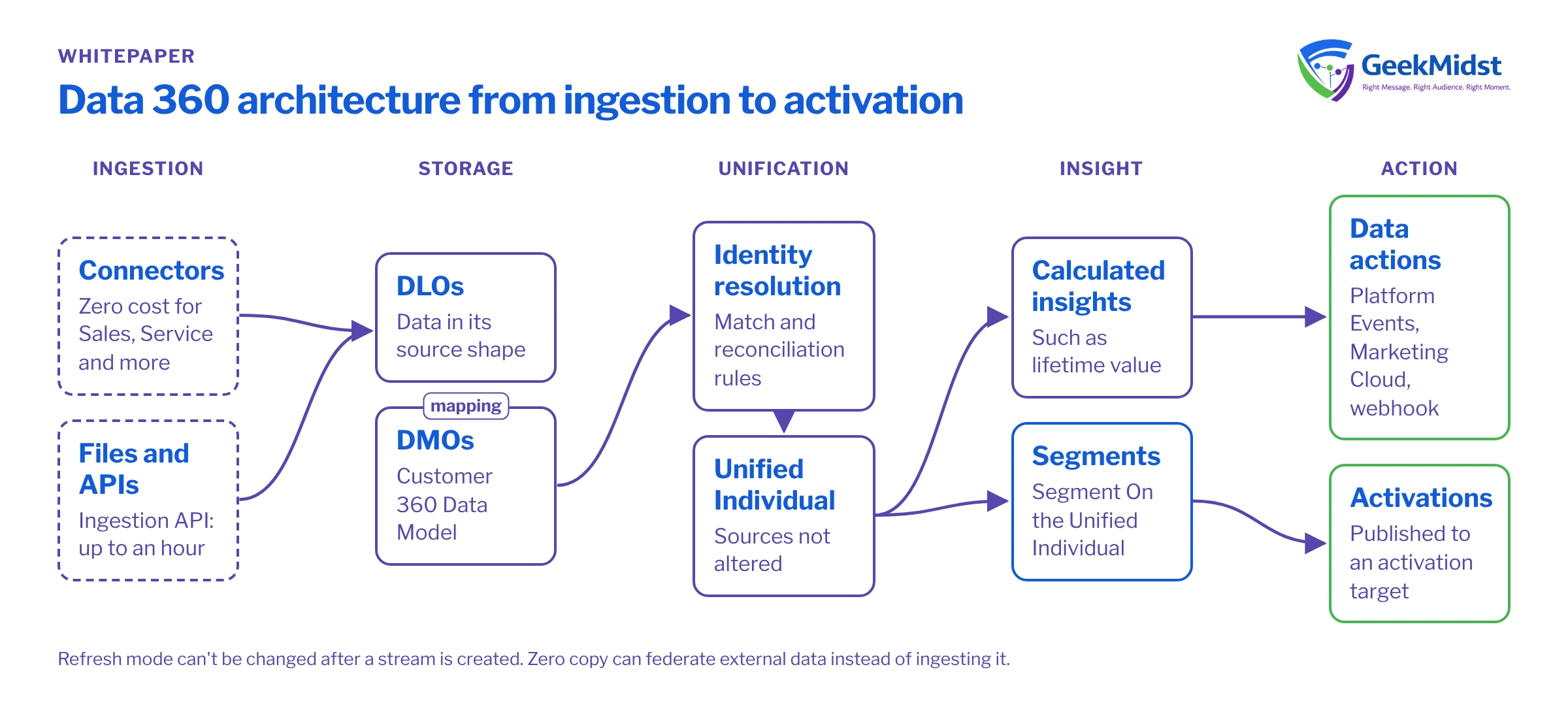
1. The architecture in one view
Data moves through Data 360 in a predictable order. Each layer has its own objects, and decisions made early are hard to reverse later.
Data 360 layers
| Layer | Main objects | Purpose |
|---|---|---|
| Ingestion | Data streams and connectors | Bring data in from CRM, files, APIs and other sources |
| Storage | Data Lake Objects (DLOs) | Hold ingested data in its source shape |
| Harmonisation | Data Model Objects (DMOs) | Map data to the Customer 360 Data Model |
| Unification | Identity resolution rulesets; Unified DMOs | Match and merge records into unified profiles |
| Insight | Calculated Insight Objects (CIOs) | Store metrics such as lifetime value |
| Action | Segments, activation targets, activations and data actions | Send audiences and signals to other systems |
2. Ingestion
Data enters through data streams. Salesforce provides connectors for its own clouds, including Sales, Service, Industries, B2C Commerce and Marketing Cloud Engagement, which it describes as "zero cost connectors". Unstructured data and CSV files are also supported.
When you create a data stream, you make three choices that matter later:
- Category: Profile, Engagement or Other. Engagement streams need an Event Time field.
- Primary key: the field that uniquely identifies each record. Stream formula fields can build a key or a flag if the source lacks one.
- Refresh mode: Salesforce states this "cannot be changed" after the stream is created, so decide it deliberately.
Latency by path
Not every path is real time. A standard web or mobile data stream into DLOs ingests engagement data every 15 minutes and profile data every hour. The Ingestion API can take up to an hour to show data. For faster use cases, Salesforce documents a real-time layer: under the Sub-Second Real-Time Profile, 95% of events complete ingestion and real-time activation within about 500 milliseconds. Salesforce notes performance "can vary", and the page gives no beta or GA label. Real-time capabilities need real-time data graphs.
Ingestion paths and timing
| Path | Timing stated by Salesforce |
|---|---|
| Standard web or mobile stream, engagement data | Every 15 minutes |
| Standard web or mobile stream, profile data | Every hour |
| Ingestion API | Up to an hour to show data |
| Real-time layer (Sub-Second Real-Time Profile) | About 500 ms for 95% of events; can vary |
3. From DLO to DMO
Salesforce defines a DLO as "a container for the data ingested into Data 360" and a DMO as "a harmonized grouping of data", mapped to the Customer 360 Data Model. Mapping is where most design effort goes: each source field is assigned to a standard or custom DMO field. Starter data bundles can map common sources automatically, which saves time for standard Salesforce data. For custom sources, see mapping custom sources to the Customer 360 data model and DLO vs DMO.
When the data needs reshaping before or after mapping, use data transforms. Both kinds can read from and write to DLOs or DMOs.
Batch vs streaming transforms
| Feature | Batch transform | Streaming transform |
|---|---|---|
| Runs | On a schedule | Continuously |
| Authoring | Visual editor, with more functions | SQL-based |
| Suits | Heavier reshaping and joins | Light, record-by-record changes |
4. Identity resolution
Identity resolution turns many source records into one profile. A ruleset has two parts:
- Match rules decide which records belong together. They can be exact, fuzzy or normalised, for example a fuzzy name match combined with a normalised email or phone.
- Reconciliation rules decide which value wins when sources disagree: most frequent, most recent, or source priority.
The outputs are the Unified Individual, unified link objects and unified contact points. Source data is not altered, so you can change rules and re-run. Each run has a cost, and Salesforce notes that turning off "Run jobs automatically" can reduce it. Real-time identity resolution needs a real-time data graph. Check data quality before you tune rules; see data quality checks before identity resolution and our identity resolution service.
5. Calculated insights
Calculated insights are multidimensional metrics, such as lifetime value, defined at profile, segment or population level and stored in Calculated Insight Objects. They can be queried through the Data 360 and Connect REST APIs, and they can trigger data actions to Platform Events, Marketing Cloud or a webhook. That makes them the bridge between analysis and automation: an insight crossing a threshold can start a process elsewhere.
6. Segments and activation
From segment to activation
- 01
Choose the entity
Build the segment "Segment On" an entity, usually the Unified Individual.
- 02
Define the criteria
Use DMO attributes and calculated insights to describe the audience.
- 03
Set up the target
Create an activation target, which stores the authentication details for the destination platform.
- 04
Create the activation
Link the segment to the target and choose direct and related attributes.
- 05
Publish
Publish on a schedule or with "Publish Now". Activations support incremental refresh, and results land in an Audience DMO.
- 06
Check the result
Confirm counts and attributes at the destination before any campaign uses them.
Check Salesforce Help for the current list of supported activation targets before you design around one. For Marketing Cloud destinations, see activating Data Cloud segments to Marketing Cloud.
7. Zero copy
Zero copy lets Data 360 work with data held in external platforms without copying all of it. Salesforce lists AWS, Databricks, Google Cloud and Snowflake as partners, plus Microsoft and IBM, with out-of-the-box support for Snowflake, Databricks, Redshift and BigQuery.
Zero copy mechanisms and status
| Mechanism | What it does | Status as stated |
|---|---|---|
| Query federation | Live queries to the external platform, with nothing stored | Not labelled on the page |
| File federation | Reads files held in the external platform | "In Beta Now" on Salesforce's page; the label may be out of date, so check Help |
| Bi-directional data sharing | Shares insights back out to the external platform | Not labelled on the page |
| Live Query | Queries external data live | Not labelled on the page |
| Cached Acceleration | Optional caching for performance | Not labelled on the page |
| BigQuery zero copy expansion | Wider BigQuery support | Announced at Dreamforce 2026 as "GA Fall 2026" |
| Python code extensions on zero-copy data | Run Python against zero-copy data | CLI plugin in Beta (Winter '27) |
The main design question is whether to federate or ingest. Federation avoids duplication and keeps data where it is governed, while ingestion can suit data that is joined and resolved often. See data virtualisation vs data replication.
8. Consent
For Marketing Cloud Next on Data 360, consent is stored as DMOs and checked at send time. The core objects are Contact Point, Communication Subscription, Engagement Channel Type, Communication Subscription Channel Type and Communication Subscription Consent, which records opt-in or opt-out per contact point, subscription and channel. On the web, the Salesforce Interactions SDK sends events only after a visitor has consented to tracking. Design consent alongside identity, not after it, and check your obligations with your legal adviser.
9. Designing for agents
Data 360 also serves as context for AI agents. The Data 360 MCP Server, exposing nearly 200 Data 360 APIs, has been GA since August 2026. Winter '27 adds Agentic Segmentation and Activation, Agent Memory and Salesforce Catalog, for which Salesforce has not stated a status, so treat them as not yet GA.
10. Architecture decisions checklist
- Data streams: category, primary key and refresh mode chosen per source.
- Latency: each use case matched to a standard or real-time path.
- Mapping: every source field assigned to a DMO, with custom objects justified.
- Identity: match and reconciliation rules agreed with data owners, and the job schedule set with cost in mind.
- Insights: calculated insights defined with owners and refresh needs.
- Activation: targets, attributes and destination checks documented.
- Zero copy: federate-or-ingest decision recorded per source, with status checked.
- Consent: objects mapped and tested before the first activation.
Use the data and personalization readiness assessment or the Data Cloud readiness checklist to test where you stand.
Questions we hear
Is Data 360 the same as Data Cloud?
Should we ingest everything we have?
Can we change identity resolution rules later?
Do we need the real-time layer?
Related reading
Data 360 consulting
How we scope and deliver Data 360 work
→Data 360 ingestion and modelling
Streams, mapping and the data model
→How identity resolution match rules work
Designing rules that hold up
→Sources
- https://developer.salesforce.com/docs/data/data-cloud-dev/guide/dc-object-model.html
- https://developer.salesforce.com/docs/data/data-cloud-int/guide/c360-a-create-ingestion-data-stream.html
- https://developer.salesforce.com/docs/data/data-cloud-ref/guide/c360a-real-time-ingestion-api.htm
- https://www.salesforce.com/data/connectivity/zero-copy/
- https://trailhead.salesforce.com/content/learn/projects/explore-data-cloud-core-functionality/unify-your-data
Designing a Data 360 architecture?
We can review your sources, data model, identity rules and activation design before you build.


