

What Is Real-Time Personalization?
A plain-English explainer on real-time personalization: what it means, how quickly "real time" really is, worked examples, and what you need underneath.

Real-time personalization means changing what a person sees while they are still in the moment: the next web page, the app screen, the email they are opening, or the answer an agent gives. The choice is based on what they are doing right now, combined with what you already know about them. The key word is now. The decision happens during the interaction, not in an overnight batch job that prepares tomorrow's email.
This explainer covers what "real time" actually means, everyday examples, the building blocks you need, and how Salesforce products approach it. If you are already comparing tools, read our guide to personalization engines, platforms and implementation services instead.
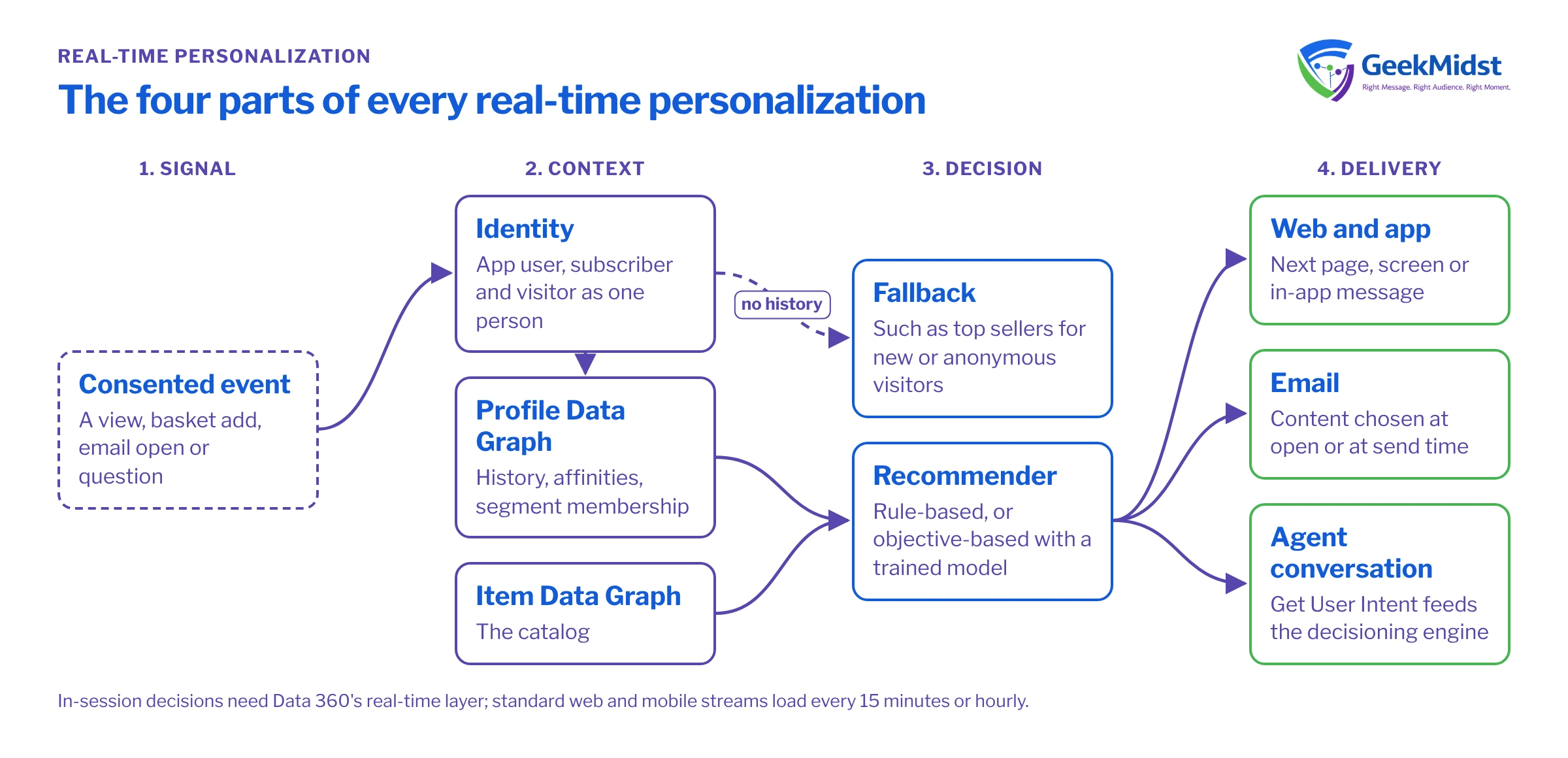
A simple definition
Every real-time personalization has four parts:
- A signal. Something the person does: views a product, adds to a cart, opens an email, asks a question.
- Context. What you know about them already: past purchases, interests, segment membership, consent choices.
- A decision. A rule or a model picks the best content, product or offer for this person at this moment.
- Delivery. The chosen content appears in the channel they are using.
"Real time" describes the gap between the signal and the decision. The shorter the gap, the more the experience can respond to the current visit rather than the last one.
How fast is "real time"?
It is a spectrum, and most programmes use more than one speed.
Three speeds of personalization
| Speed | What it looks like | Example |
|---|---|---|
| In-session (well under a second) | The next page or screen reflects what the visitor just did | Browsing running shoes changes the homepage banner on the next click |
| Near real time (minutes) | A message follows soon after an action | A reminder after a basket is left, once a short wait has passed |
| Batch (hours or daily) | Audiences refresh on a schedule | A nightly segment refresh decides who gets tomorrow's newsletter |
Salesforce documents both ends of this spectrum in Data 360. Its real-time layer states that "95% of events complete end-to-end ingestion from capture through real-time layer activation within approximately 500 milliseconds under the Sub-Second Real-Time Profile", for events from the Web SDK, Mobile SDK or server-to-server ingestion. Salesforce adds that performance "can vary", and that page gives no beta or GA label. By contrast, a standard web or mobile data stream into data lake objects ingests "engagement data every 15 minutes and profile data every hour". So in-session decisions depend on the real-time layer, not the standard batch path.
Everyday examples
- Retail homepage. A returning visitor who browsed hiking boots sees outdoor gear first. A brand-new visitor with no history sees a sensible fallback, such as top sellers.
- B2B website. A visitor who has read three integration pages sees an integration guide offered, rather than a generic newsletter sign-up.
- Email at open. Marketing Cloud Personalization offers Open Time Email campaigns, which update content at the moment the email is opened, so an offer that has expired can be swapped.
- Email at send. With Salesforce Personalization and Marketing Cloud Advanced email, a recommender acts as a data source and the system makes a server-side call for each recipient at send time.
- Mobile app. An in-app message reflects the category someone has just viewed.
- Agent conversations. Salesforce describes a "Get User Intent" action that feeds the decisioning engine, so what a customer asks an agent can shape what they are shown next.
What you need underneath
Personalization is mostly a data problem. Before any decision can run, you need:
- Consented event capture. The Salesforce Interactions SDK "send[s] events only if a customer has consented to tracking" and stops at once when consent is revoked. Plan your consent design first, and check it with your legal adviser.
- Identity. Knowing that the app user, the email subscriber and the website visitor are the same person. See real-time identity resolution and data graphs and how match rules work.
- A profile and a catalog. Salesforce Personalization uses a Profile Data Graph (purchase and browse history, affinities, segment membership) and an Item Data Graph (the catalog). Decisions read the profile data graph at request time.
- Decision logic. Rule-based recommenders sort items by criteria such as Top Sellers and need no training. Objective-based recommenders use a deep-learning model and need a Real-Time Profile Data Graph with at least three recorded engagement activities for initial training.
- Content. Templates and content variations for each placement.
- Measurement. A/B or multivariate experiments with a control group, so you can tell whether personalization helped.
How Salesforce approaches it
Salesforce has two personalization products, and the names are easy to mix up:
- Salesforce Personalization is the newer product, built natively on the Salesforce Platform and Data 360. Salesforce calls it "the recommended path forward" for new customers. Data 360 must be provisioned. No public GA date was found, but it is sold on the pricing page.
- Marketing Cloud Personalization (formerly Interaction Studio, and before that Evergage) is described as a "standalone, real-time interaction management platform".
Both are licensed products. Salesforce sells two SKUs, Salesforce Personalization and Marketing Cloud Personalization+, priced per org per month with an allotment of personalization credits. We don't quote prices; check the current pricing page or ask your account executive. The engine vs platform guide compares them in more depth.
Common misconceptions
- "Everything must be real time." It doesn't. Many good programmes run batch segments for email and keep real-time decisions for the website and app.
- "Personalization means using a first name." Inserting a name is merge-field personalization. Real-time personalization changes the content, product or offer itself.
- "The model will sort it out." Without clean identity, a catalog and consent, a model has nothing reliable to work with.
- "No fallback needed." Every placement needs a default for anonymous or new visitors.
Where to start
Pick one moment that matters, such as the homepage for returning visitors. Decide what you would change, the data that decision needs, and how you will measure it against a control group. Our real-time personalization blueprint sets out the architecture, and the data and personalization readiness check helps you see what is missing. When you are ready to plan, our personalization consulting team can scope the work with you.
Questions we hear
Is real-time personalization the same as segmentation?
Do I need Data 360 for Salesforce Personalization?
What happens for visitors you know nothing about?
How do I know if it works?
Sources
Plan your first real-time use case
Tell us the moment you want to personalize and we can scope the data, decisions and measurement it needs.


