

Marketing Cloud Next Architecture Guide
A layer-by-layer guide to Marketing Cloud Next architecture: data, consent, orchestration, content, channels and AI, plus the decisions to make early.

Marketing Cloud Next is Salesforce's agentic marketing product, built on the core Salesforce Platform and Data 360. That one design choice shapes the whole architecture. Instead of a separate marketing system connected to CRM, marketing runs on the same platform as your sales and service data, using Data 360 as its data layer and Flow for much of its automation.
This guide walks through the layers and the decisions they force. It is not a project checklist (see our Marketing Cloud Next implementation checklist) or a migration plan (see planning a move from Engagement).
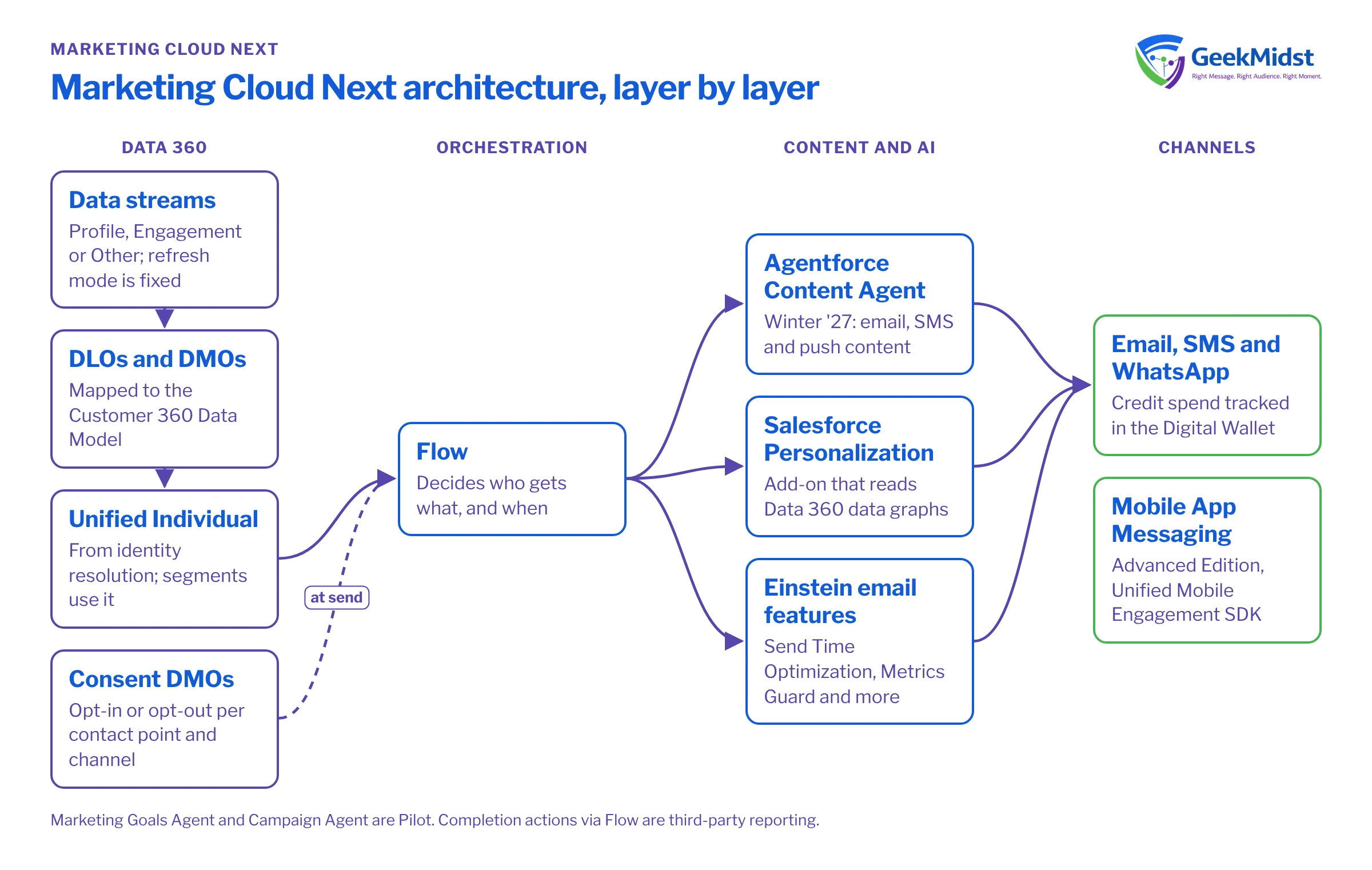
The layers at a glance
Marketing Cloud Next, layer by layer
| Layer | What it does | Named components in Salesforce sources |
|---|---|---|
| Data | Ingests, harmonizes and unifies customer data | Data 360 data streams, DLOs, DMOs, identity resolution, calculated insights, segments |
| Consent | Stores and enforces communication choices | Communication Subscription Consent and related DMOs, Preference Pages, Consent Status component |
| Orchestration | Decides who gets what, and when | Flow; marketing completion actions via Flow (Winter '27, reported by Salesforce Ben) |
| Content and personalization | Builds and tailors messages | Agentforce Content Agent; Salesforce Personalization as an add-on |
| Channels | Delivers messages | Email, SMS and WhatsApp (tracked in the Digital Wallet); Mobile App Messaging for Advanced Edition |
| AI features | Optimizes and assists | Einstein Send Time Optimization, Metrics Guard, Engagement Frequency, Engagement Scoring; marketing agents |
| Analytics | Measures results | Marketing Intelligence; Intelligence+ for existing customers |
Editions and the "+" path
Salesforce says new customers start with Marketing Cloud Growth Edition or Advanced Edition. Existing customers get Marketing Cloud Next capabilities by renewing into "+" versions: Engagement+, Account Engagement+, Personalization+ and Intelligence+. Feature-by-edition detail is not fully stated in the sources we use, so confirm what your edition includes with Salesforce before you design around a feature.
The data layer: Data 360
Everything starts with Data 360, and most architecture mistakes start here too.
- Data streams bring data in. Each stream has a category (Profile, Engagement or Other), a primary key and, for Engagement data, an Event Time field. Salesforce warns that the Refresh Mode "cannot be changed" after creation, so decide it up front. Data from the Ingestion API can take up to an hour to appear.
- CRM sources such as Sales Cloud, Service Cloud and Marketing Cloud Engagement use what Salesforce calls "zero cost connectors".
- DLOs and DMOs. A data lake object is "a container for the data ingested into Data 360". A data model object is "a harmonized grouping of data", mapped to the Customer 360 Data Model. Our DLO vs DMO explainer goes deeper.
- Identity resolution produces the Unified Individual, which segments are usually built on.
- Calculated insights hold metrics such as lifetime value and can trigger data actions.
Speed matters here. A standard web or mobile data stream ingests engagement data every 15 minutes and profile data every hour. Sub-second use cases need Data 360's real-time layer and real-time data graphs. See choosing data stream ingestion patterns.
Consent as data
In Marketing Cloud Next, consent is part of the data model. It is stored as DMOs in Data 360 and checked at send time. The objects are Contact Point, Communication Subscription, Engagement Channel Type, Communication Subscription Channel Type and Communication Subscription Consent, which records opt-in or opt-out per contact point, subscription and channel.
Salesforce lists Preference Pages, a Consent Status component, CSV consent imports and Flow as the tools. Only Data Cloud record-triggered, automation-event and on-demand flows apply, and Salesforce warns against using the MessagingConsent actions. Our article on designing consent in Marketing Cloud Next covers the design in detail. Check your consent rules with your legal adviser.
Orchestration with Flow
Because Marketing Cloud Next sits on the core platform, Flow is the orchestration tool. According to Salesforce Ben's reading of the Winter '27 release notes, Pardot-style "completion actions" arrive in Marketing Cloud Next via Flow; treat that as third-party reporting until you have checked Help. For journey design, see journey orchestration patterns for Marketing Cloud Next.
Content, personalization and channels
- Content. The Agentforce Content Agent (Winter '27) produces multilingual email, SMS and push content. Salesforce Ben reports that Summer '26 extended AMPscript to Marketing Cloud Next personalization; that is third-party reporting.
- Personalization. Salesforce Personalization is offered as an add-on for Growth and Advanced Edition customers, and reads Data 360 data graphs.
- Channels. The Digital Wallet tracks messaging-credit spend for Email, SMS and WhatsApp. For apps, Advanced Edition users use the Mobile App Messaging module of the Unified Mobile Engagement SDK. Conversational Email (formerly Two-Way Email) arrived in Spring '26.
AI features and agents
Marketing Cloud Next has four Einstein email features: Einstein Send Time Optimization, Metrics Guard (bot filtering), Engagement Frequency and Engagement Scoring. You enable them per messaging channel in Setup. Our send time optimization explainer covers the first.
On agents, the Winter '27 newsroom lists the Agentforce Marketing Goals Agent and Campaign Agent as Pilot, with some orgs live. Design so the core programme works without them.
Living alongside Engagement and Account Engagement
Many organizations run Marketing Cloud Next next to Marketing Cloud Engagement or Account Engagement for a while. Two documented touchpoints help: Data 360 connects to Marketing Cloud Engagement through a zero cost connector, and Salesforce Personalization's "Batch Personalizations" can activate decisions for a Data 360 segment to Engagement for outbound sends. Our Marketing Cloud Next vs Engagement guide compares the two.
Decisions to make early
- Which org. Marketing Cloud Next runs on a Salesforce org, so agree which one and who governs it.
- Real time or batch per source. Not every stream needs the real-time layer.
- Identity rules. Match and reconciliation rules decide what a "person" is in every segment.
- Consent model. Map subscriptions and channels before you import anyone.
- Channels and credits. Know which channels you will use and how credits are tracked.
- Environments and testing. Plan sandboxes, test data and deployment; see testing and deploying Marketing Cloud Next solutions.
Questions we hear
Is Marketing Cloud Next a separate system from Salesforce CRM?
Do I need Data 360 for Marketing Cloud Next?
Can we keep Marketing Cloud Engagement?
Are the marketing agents generally available?
Sources
Get your architecture right first time
We can review your data sources, consent model and channels and sketch a Marketing Cloud Next architecture with you.


